Use the unsubscribe tool your email service already has. Gmail's Manage subscriptions page, Outlook.com's Subscriptions settings, Yahoo Mail's Subscriptions view and iCloud Mail Cleanup each list your mailing lists in one place, so you can drop dozens of senders in a few minutes. Then search for the old newsletters and delete them in one go. Only unsubscribe from senders you actually signed up with; for spam and phishing, report the message instead of clicking anything in it.
Below are the steps for each app, what to know before you hand your inbox to a third-party service like Unroll.Me, and what to do when emails keep coming. For blocking, filters and the rest of the cleanup, see our guide to managing your inbox.
How to mass unsubscribe in Gmail
Gmail has two ways to do it. Both work on the web and in the Gmail app for Android, iPhone and iPad.
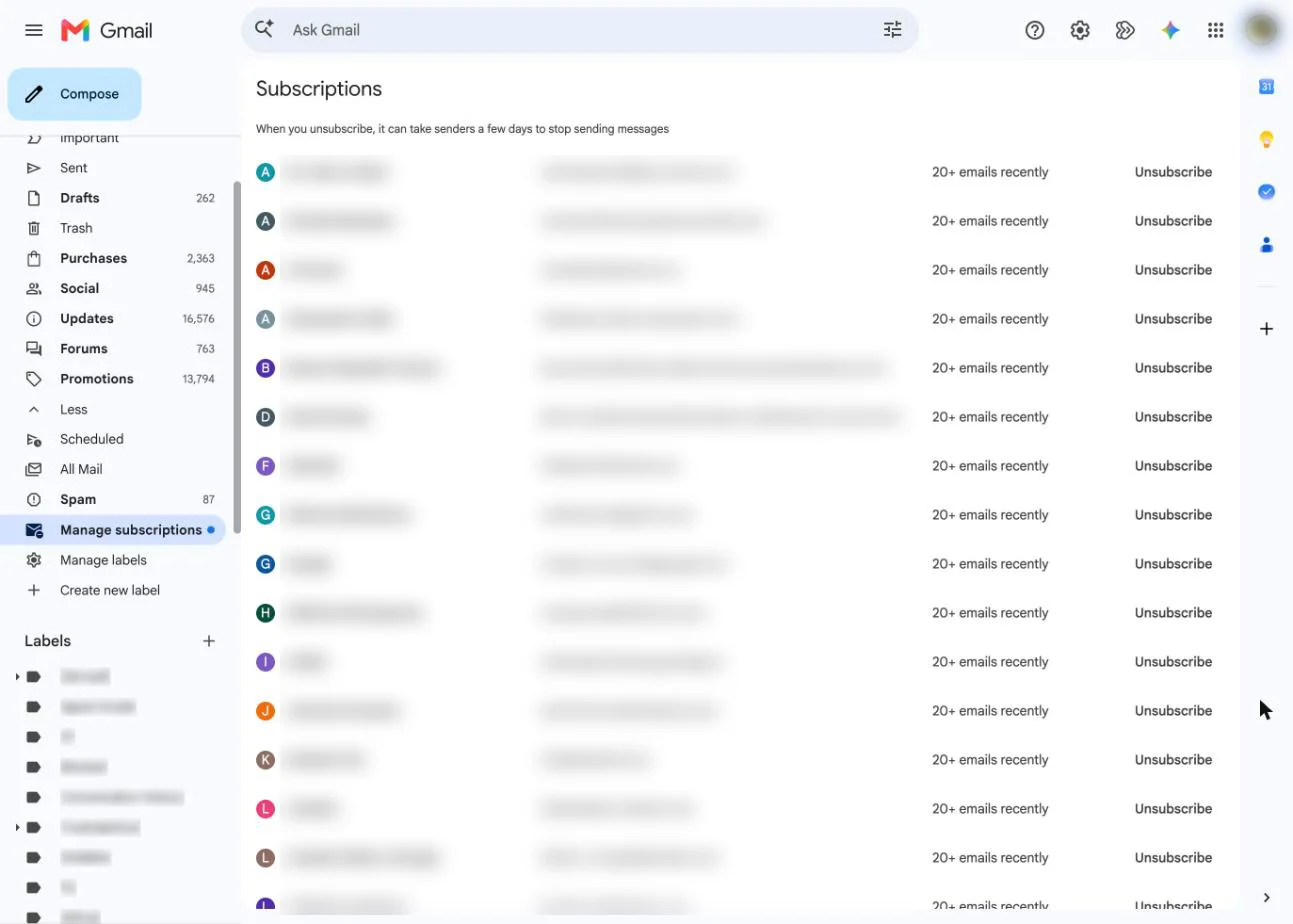
All your subscriptions at once: Manage subscriptions
- On a computer, open Gmail and click More in the left sidebar, then Manage subscriptions. In the app, tap Menu at the top left, then Manage subscriptions.
- Senders are listed with a count of how many emails they've sent you recently. Click a name to see their messages first if you're not sure.
- Click Unsubscribe next to each sender you're done with.
Gmail unsubscribes you from every active mailing list tied to that sender, and any new email from them goes to Spam with a banner explaining why. If a sender only accepts requests on its own site, Gmail offers Go to website or Block instead. Google says the page is still rolling out, so some accounts don't have it yet.
One email at a time
Open the email and click Unsubscribe next to the sender's name, then confirm in the pop-up. This can remove you from only one of that sender's lists, and Google says it may take a few days before the emails stop. Our guide to unsubscribing from emails on Gmail covers both methods in more detail, plus blocking.
How to mass unsubscribe in Outlook
Outlook.com and Outlook on the web (personal Microsoft accounts):
- Select Settings (the gear icon), then Mail, then Subscriptions.
- Under "Your current subscriptions", select Unsubscribe next to each sender and confirm.
- To block a sender instead, select the three dots next to it and choose the block option.
Outlook builds this list by checking incoming mail for subscription information in the message header, so it only shows senders it recognizes. A sender won't appear if its mail went to Junk or you've already blocked it.
Outlook for Windows and Mac, and work or school accounts: Microsoft doesn't document a bulk unsubscribe page for these. Use the unsubscribe link at the bottom of each email, or block the sender. To deal with a sender's existing mail, select one of their messages and use Sweep to delete everything from them, keep only the latest, or delete anything older than 10 days. Sweep can also apply to future messages. For more Outlook sorting, see how to filter your Hotmail and Outlook inbox.
How to mass unsubscribe in Yahoo Mail
Yahoo Mail's Subscriptions view lists your mailing lists and lets you unsubscribe from each in one tap. Yahoo offers it on desktop, in the Yahoo Mail app and on mobile web, though smart features don't launch in every region at the same time. For a single message, open it and select Unsubscribe at the top when Yahoo shows that option, or use the link at the bottom of the email.
Yahoo also warns against services that promise to remove your address from spam lists, because many of them collect addresses for spammers.
How to unsubscribe in Apple Mail on Mac
When Mail recognizes a message as coming from a mailing list, a banner under the header says so and shows an Unsubscribe button. Click it, then click OK. Mail sends the request and the banner disappears. To get those emails again later, you have to sign up again on the sender's site.
Mail on the Mac handles one list at a time; there's no bulk page. If you use iCloud Mail, the iCloud Mail Cleanup option in the next section does the bulk part. Our guide to unsubscribing in Apple Mail on Mac explains why the banner sometimes doesn't appear.
How to mass unsubscribe on iPhone and iPad
Single emails in the Mail app: on many newsletters, Mail shows a banner at the top of the message with an Unsubscribe option. Tap it, then confirm. No banner means the sender didn't include unsubscribe information, so use the link at the bottom of the email instead.
In bulk, for iCloud Mail addresses: iCloud Mail Cleanup recommends senders from your Updates and Promotions categories to unsubscribe from all at once.
- Open the Settings app and tap your name, then iCloud.
- Below Saved to iCloud, tap Mail, then iCloud Mail Cleanup.
- Under Unsubscribe Recommendations, tap Get Recommendations.
- Select each sender you want to drop, then tap Unsubscribe.
Future messages from those senders go straight to the Trash. You can do the same on a computer at iCloud.com: open Mail, select iCloud Mail Cleanup at the bottom of the mailbox list, then look under Unsubscribed. Recommendations only appear once you've received enough mail in those two categories, and the feature isn't available in every language.
For Gmail or Outlook accounts on your iPhone, the Gmail app and Outlook.com tools above are the faster route. More iPhone mail settings are in our iPhone Mail guide.
How to unsubscribe in Canary Mail
Disclosure: we make Canary Mail. Canary is an email app for Mac, iPhone, iPad, Windows and Android that works with Gmail, Outlook, iCloud, Yahoo and other IMAP accounts in one unified inbox. Its 1-Click Unsubscribe is included on every plan, including Free. Because all your accounts sit in one inbox, you can drop newsletters from Gmail, Outlook, iCloud and Yahoo in the same place instead of visiting each provider's settings.
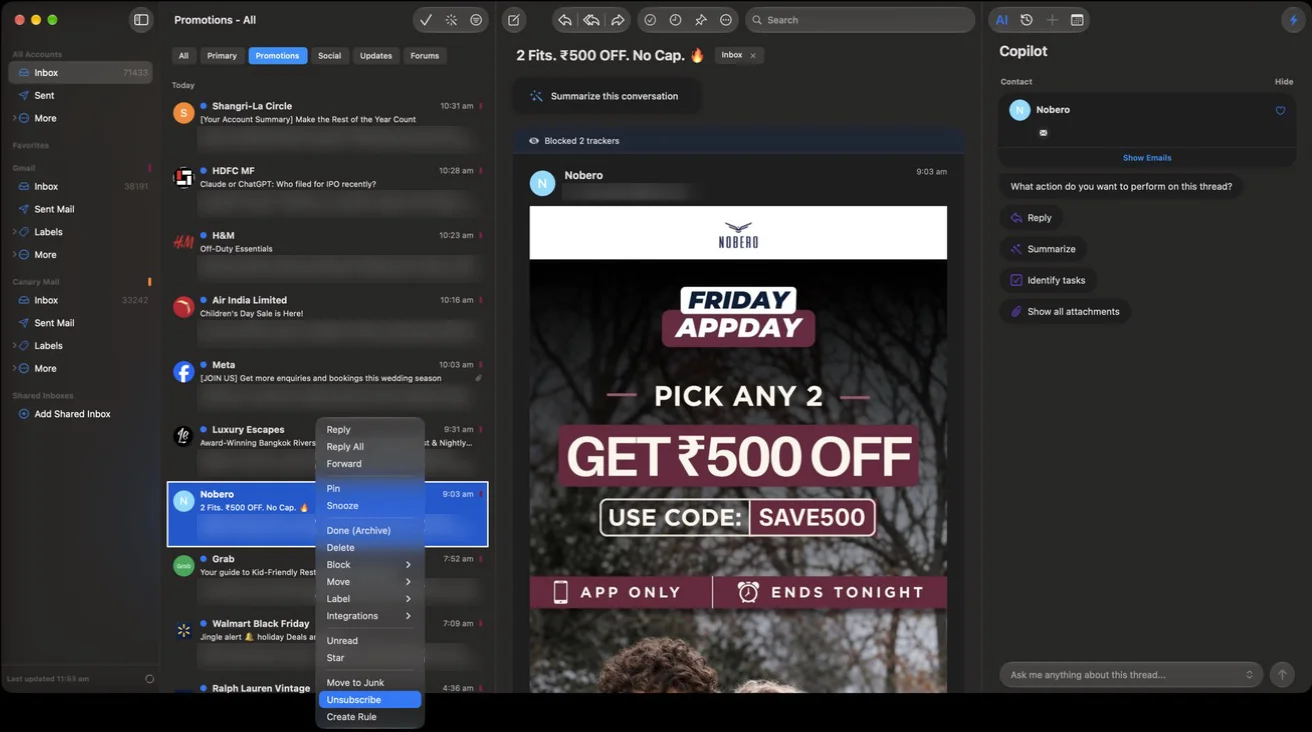
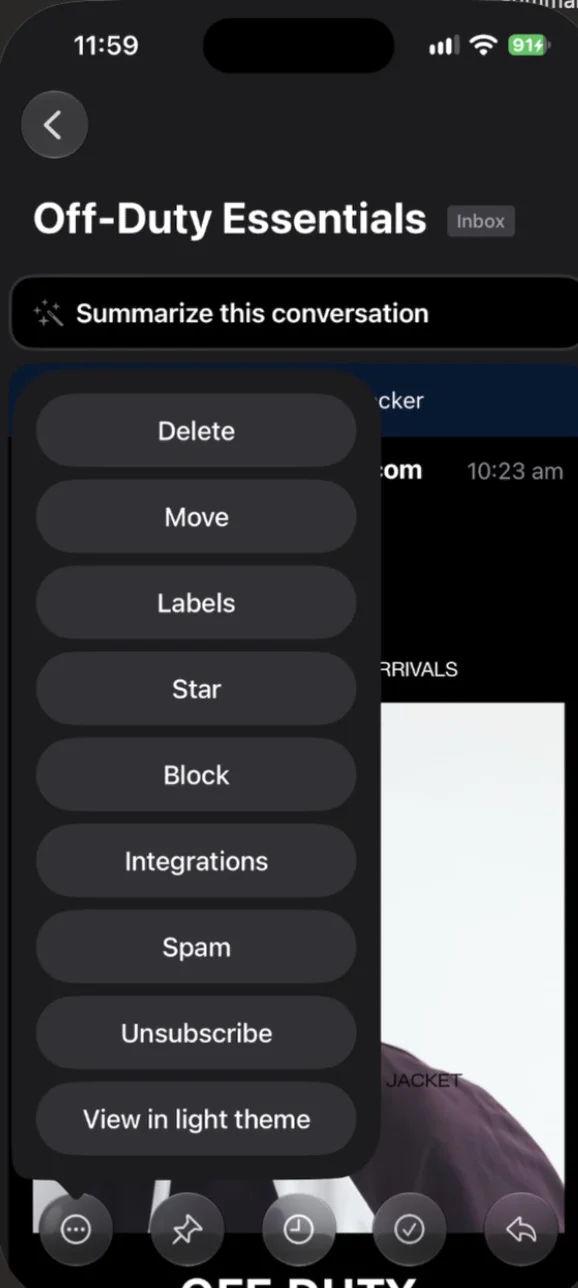
For the old mail, Bulk Cleaner picks out unimportant messages for you. On a Mac, click the magic wand icon and scroll; on iPhone, tap Home, then More, then Auto Select Unimportant. More messages are selected as you scroll, and the action you pick applies to all of them. Check the selection before you confirm.
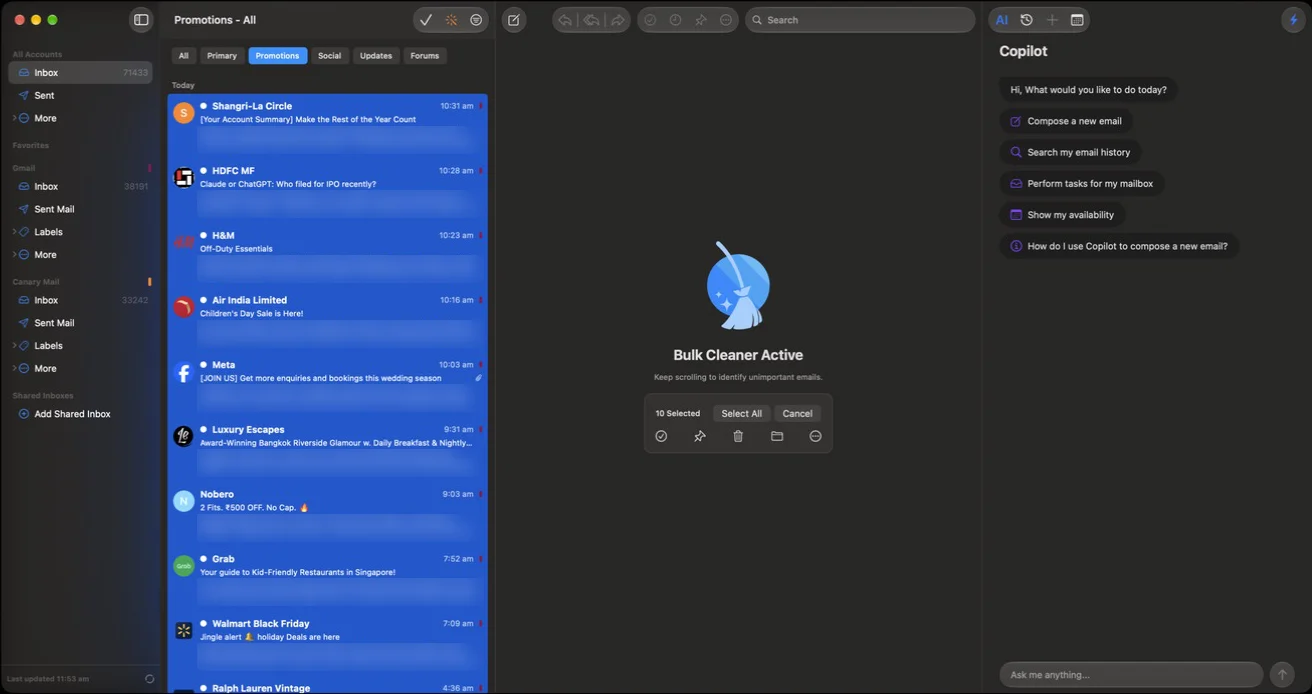
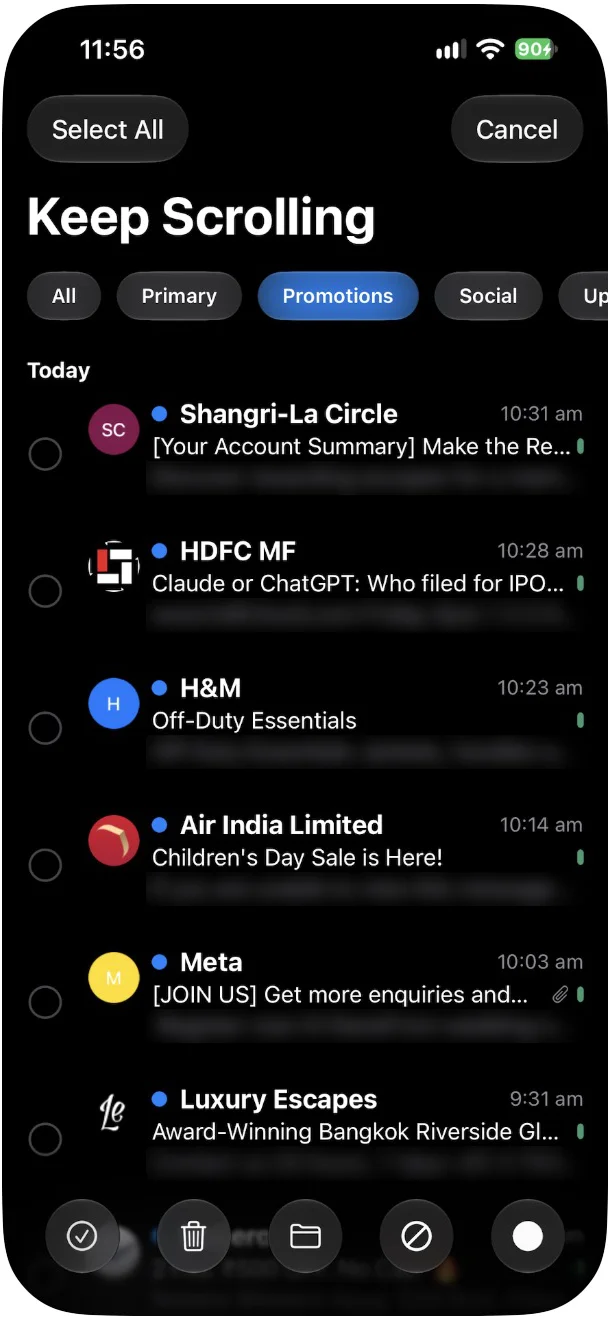
Price: Free covers unlimited accounts on 2 devices. The pricing page lists the Gray Mail Cleaner on Growth ($36 a year) and Pro+ ($100 a year), with a 7-day free trial. Downside: Canary has no spam filter of its own. It relies on your provider's, so reporting spam still happens in Gmail, Outlook or iCloud.
Clear out the newsletters you already have
Unsubscribing stops new mail. The hundreds already in your inbox stay put until you delete them. A search does most of the work:
- Gmail: search
unsubscribe(nearly every marketing email contains the word),category:promotions, orcategory:promotions older_than:1y. Select all, click the link that selects every matching conversation, then delete or archive. Our guide to deleting emails on Gmail in bulk walks through it. - Outlook: select a message from the sender and use Sweep to remove everything from them.
- Apple Mail: search the sender's name or "unsubscribe", press Command-A to select the results, then delete.
Look over the results before you delete. Receipts, bank statements and account emails often contain the word "unsubscribe" too. Gmail keeps deleted mail in Trash for 30 days if you get it wrong. For newsletters you want but don't need to see right away, a filter is better than a delete: you can create rules in Gmail to label them and skip the inbox.
Is Unroll.Me safe? What third-party unsubscribe services do with your inbox
Services that unsubscribe you in bulk need permission to read your mailbox. That's how they find your subscriptions. The question is what else they do with the access.
Unroll.Me is the best-known example. In August 2019 the US Federal Trade Commission announced a settlement with Unrollme Inc. The FTC alleged that Unroll.Me told people who hesitated to grant access that it wouldn't "touch" their personal emails. Meanwhile it was sharing users' email receipts with its parent company, Slice Technologies, which used the purchase information in market research products it sold. The FTC noted that e-receipts can include your name, billing and shipping addresses, and what you bought. The order bars Unroll.Me from misrepresenting how it collects and shares data and required it to delete stored e-receipts from users who signed up after those statements, unless they gave consent. It runs for 20 years.
Today Unroll.Me's own data page says it is owned by NielsenIQ, a consumer data company. It says it reads the commercial emails in your inbox (receipts, travel reservations, shipping confirmations, subscriptions) and uses that data for advertising products, measurement products and datasets that it sells to businesses. It also says your identifiable personal information is never sold to target you directly. So the service now discloses the data use. Whether that's a fair trade for unsubscribing is your call.
Before you connect any unsubscribe service, check three things:
- How it makes money. If it's free, read the privacy policy for words like "measurement", "datasets" or "research".
- What access it asks for. Reading and changing all of your email is a lot to hand over to save a few minutes.
- Whether your email service already does the job. Gmail, Outlook.com, Yahoo and iCloud all have free bulk tools now.
Already connected one you no longer want? For a Google account, go to myaccount.google.com/linkedapps, select Access to your Google Account, choose the app, then See details and Remove access. That stops future access. Google doesn't say it deletes what the app already collected, so ask the service to delete your account and data too.
When not to click unsubscribe
Unsubscribing works with companies you gave your address to. Spammers are different. Clicking a link in their email, or even opening it, can tell them your address is active, and the FTC warns that links in phishing emails can install malware. Apple's advice for iCloud Mail is to delete suspected junk before you open it.
| Situation | What to do |
|---|---|
| A store, app or newsletter you signed up for | Unsubscribe with your email app's built-in button |
| You never signed up and it's advertising | Report it as spam or junk |
| It asks you to sign in, pay or "verify" something | Report it as phishing and delete it; don't click anything |
| A person or sender ignores unsubscribe requests | Block the sender or domain |
Gmail's and Apple Mail's built-in Unsubscribe buttons are safer than the link in the footer because they use the sender's own unsubscribe instructions from the message header. You don't open a web page. Our guides on how to stop spam emails and how to spot phishing emails cover what to do instead, and you can block emails from a sender in any app.
Still getting emails after you unsubscribed?
- Give it time. US law (the CAN-SPAM Act) gives senders up to 10 business days to honor an opt-out. Google says Gmail requests can take a few days.
- You may be on more than one list. One company can run separate lists for deals, news and product updates. Gmail's Manage subscriptions removes you from all of a sender's lists; a single unsubscribe link may not. Look for a "preferences" page in the footer that turns everything off.
- Receipts, shipping notices and security alerts aren't marketing, so unsubscribing never stops them.
- Buying something or creating an account often re-adds you. Untick the marketing box at checkout. An email alias for shopping keeps this mail out of your main inbox.
- Some senders just ignore requests. Block them, or set up a filter that sends their mail straight to Trash. If you never joined the list, report it as spam.
For the rest of the cleanup, from filters to inbox zero, see our guide to managing your inbox.
Frequently asked questions
Can you mass unsubscribe from emails for free?
Yes. Gmail (Manage subscriptions), Outlook.com (Settings, Mail, Subscriptions), Yahoo Mail (Subscriptions view) and iCloud Mail (iCloud Mail Cleanup) all list your mailing lists in one place and let you unsubscribe from many senders without a paid app.
Is Unroll.Me safe?
It's a legitimate service, but it reads your commercial emails and uses that data for advertising and measurement products it sells to businesses, as its own data page says. In 2019 it settled FTC charges that it misled users about sharing their email receipts. If that trade-off bothers you, use your email provider's built-in unsubscribe tools.
Does Unroll.Me sell your data?
Unroll.Me says it sells advertising products, measurement products and datasets built from users' commercial emails, and that it doesn't sell identifiable personal information to target you directly. It is owned by NielsenIQ.
Is it safe to click unsubscribe in an email?
For companies you signed up with, yes, and the Unsubscribe button in Gmail or Apple Mail is the safest way. For spam or anything that looks like phishing, don't click; report the message as spam or phishing and delete it.
How do I unsubscribe from emails in bulk on iPhone?
For an iCloud address, go to Settings, tap your name, then iCloud, Mail, iCloud Mail Cleanup, and tap Get Recommendations under Unsubscribe Recommendations. For Gmail, open the Gmail app, tap Menu, then Manage subscriptions.
Why do I keep getting emails after unsubscribing?
Senders can take up to 10 business days under CAN-SPAM, you may be on more than one of their lists, or the email is transactional. If mail keeps coming after two weeks, block the sender or report it as spam.
How do I unsubscribe when there's no unsubscribe link?
Check Gmail's Manage subscriptions or Outlook.com's Subscriptions page first. If the sender isn't there, block it. If you never signed up, report it as spam, which also trains your provider's filter.
Sources
- Google: Manage your subscriptions in Gmail
- Google: Unsubscribe from an email
- Google: Search operators you can use with Gmail
- Google: Manage connections between your Google Account and third parties
- Google: Email sender guidelines
- Microsoft: How to manage email subscriptions in Outlook.com
- Microsoft: Organize your inbox with Archive, Sweep and other tools
- Yahoo: Use Yahoo Mail smart features
- Yahoo: Manage spam and mailing lists in Yahoo Mail
- Apple: Reduce junk mail in Mail on Mac
- Apple: Automatically clean up your iCloud Mail inbox on iPhone
- Apple: Automatically clean up your iCloud Mail inbox on iCloud.com
- Apple: Report and reduce spam in iCloud Mail
- FTC: Operator of email management service settles FTC allegations (August 8, 2019)
- Federal Register: Unrollme Inc.; analysis of proposed consent order (August 20, 2019)
- FTC: CAN-SPAM Act: a compliance guide for business
- FTC: How to get less spam in your email
- Unroll.Me: Your data
- Canary Mail: Pricing, Bulk Cleaner on macOS, Bulk Cleaner on iOS, How spam is handled in Canary