Built for iPhone users who care about privacy
- Use Gmail, Outlook, iCloud, and IMAP securely in one app
- Encryption options for sensitive emails
- Protection against trackers, phishing, and unwanted access
Your iPhone inbox contains personal conversations, work emails, financial details, and sensitive information. In practical terms, a secure email app protects your inbox from hidden trackers, suspicious links, and unauthorized access, while giving you the option to encrypt sensitive emails when needed.
You need an email app that delivers these protections without forcing you to change email providers or learn complex security tools. This secure email app for iPhone keeps your inbox private by default, adds extra protection where it matters, and still feels fast and familiar on iOS.
Who this secure email app for iPhone is for
This secure email app is built for iPhone users who want stronger privacy and security without giving up convenience.
- Individuals who want to protect personal and family communication
- Professionals managing work email on iPhone
- Users who want encryption and privacy controls without switching providers
[cta-block:ctablock1,title="Get a Secure Email App for iPhone",button="Try Canary Mail Free for iPhone",buttonlink="https://canarymail.io/downloads"]
Why generic email apps fail at protecting your inbox
Most default email apps focus on sending and receiving messages - not on protecting your privacy. Every email looks the same, whether it contains sensitive information or just a newsletter.
In a modern inbox, some emails include personal data, financial details, or confidential conversations. Others quietly track when you open them or contain risky links. When everything looks identical, it’s easy to expose private information without realizing it.
Common privacy problems iPhone users face with generic email apps
- No visibility into email privacy risks
Trackers, read receipts, and suspicious links are invisible in many default email apps. You don’t know when your activity is being monitored. - Limited encryption support
Sending sensitive information often means trusting standard email delivery without encryption or control over who can read the message. - Weak protection if your phone is accessed
Without app-level passcodes or biometric locks, email content may be exposed if your phone is shared, lost, or unlocked. - Privacy scattered across accounts
Personal, work, and client emails all have different privacy settings across different apps, making protection inconsistent. - No prioritization of sensitive conversations
A private document and a marketing email appear identical, increasing the risk of accidental exposure.
If you use your iPhone for both personal and professional email, relying on default email apps often leaves privacy gaps you can’t easily see.
Why iPhone users need a different kind of email app
iPhone users need a secure email app that highlights privacy risks, offers encryption when needed, and protects every inbox - without changing how email normally works.
What a good secure email app for iPhone should include
A secure email app for iPhone keeps your inbox private, reduces risk, and works seamlessly every day.
It’s a private email app for iPhone with optional encryption and PGP email on iPhone for sensitive messages.
Features that matter for iPhone security
1. Unified inbox with privacy-first controls
As a secure email app for iPhone, Canary Mail brings Gmail, Outlook, iCloud, Exchange, and IMAP into one protected inbox.
- Access all your Gmail, Outlook, iCloud, and IMAP accounts in one secure inbox.
- Apply consistent privacy settings so sensitive emails stay private.
Outcome: Better privacy with fewer chances to miss security warnings.
2. Encryption options for sensitive emails
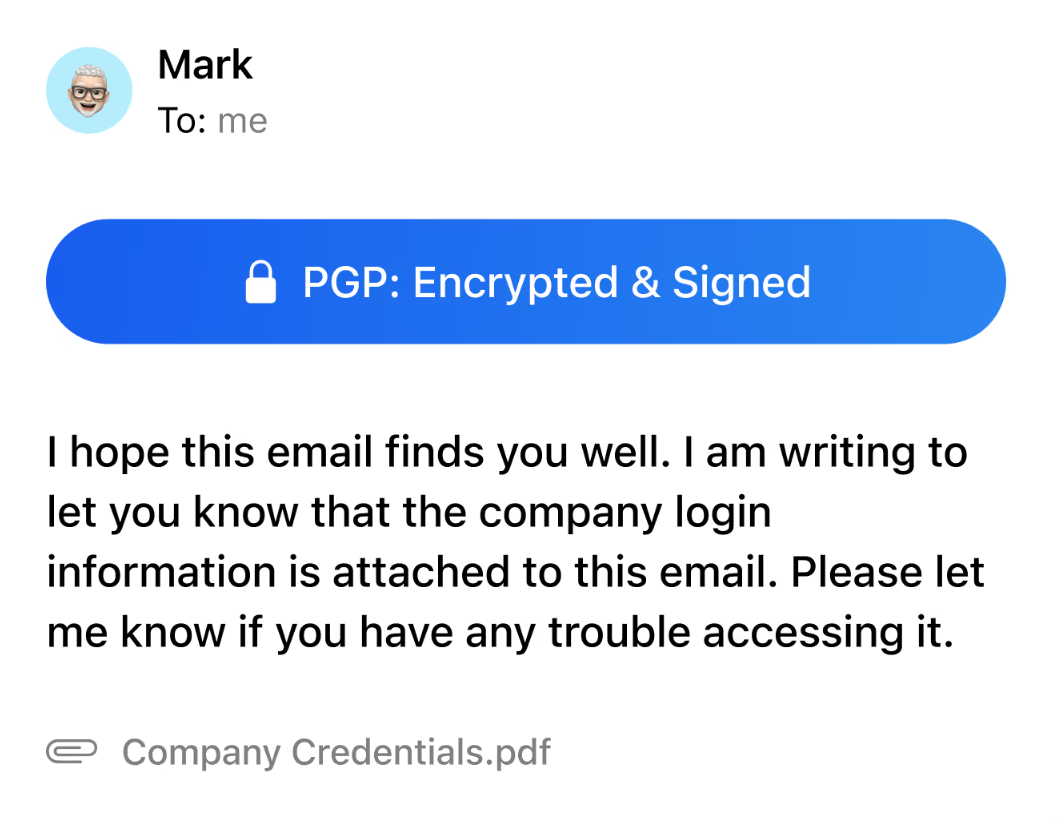
Not every email needs encryption - but some absolutely do.
- Encrypt sensitive emails when needed, including documents or private messages.
- PGP helps keep messages secure without changing how you email.
Outcome: Sensitive emails stay private without complicating everyday communication.
3. Phishing and suspicious link handling
- Hidden tracking pixels and malicious links are common in modern email.
- Detect and warn about suspicious links or senders
- Reduce accidental exposure to malware or phishing attacks
Outcome: Safer daily email use with fewer security risks.
4. Tracker blocking and privacy controls
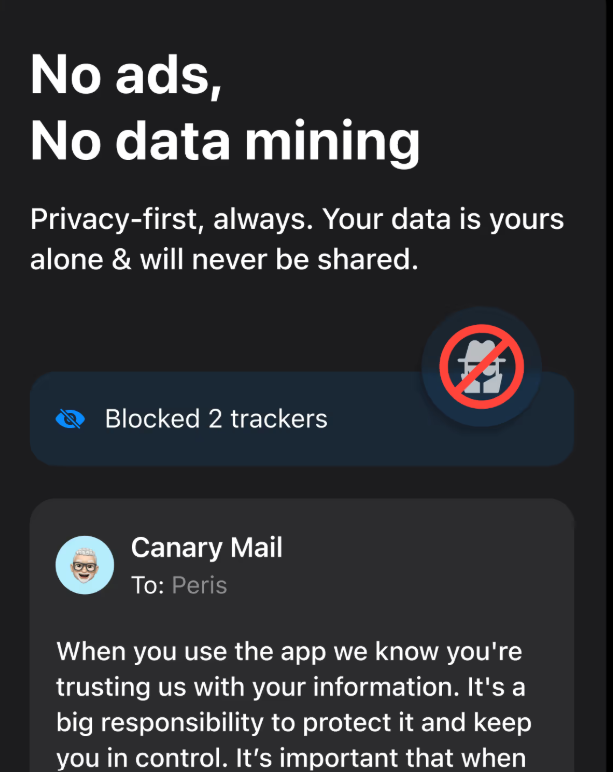
- Block invisible trackers and get alerts for suspicious links automatically.
- Keep your inbox safe from hidden monitoring and phishing attempts.
Outcome: Fewer leaks of personal information and activity.
5. Passcode / biometrics and device-level protection
Your inbox deserves protection beyond your iPhone lock screen.
- Secure the app with Face ID or passcode
- Protect email content if your phone is shared or lost
- Add an extra layer of control for sensitive inboxes
Outcome: Emails stay private even in edge cases.
6. Account support (Gmail, Outlook, iCloud, IMAP) & Data handling transparency
- Connect multiple accounts without switching apps
- Know how your data is processed and handled
- Keep privacy consistent across personal and work accounts
Outcome: Unified inbox with full control and transparency over sensitive information.
Canary Mail is engineered to be the most secure email client for iOS, offering seamless PGP encryption and biometric protection. You can explore the full range of our security features to see how we protect your data at rest and in transit.
Email workflows that protect privacy without friction
A secure email app for iPhone should support how you actually use email - without forcing constant decisions or interruptions.
1. Daily inbox check on iPhone
- Open your unified inbox
- Let tracker blocking and phishing warnings work automatically
- Scan AI summaries for context without opening risky threads
- Archive or snooze low-priority emails
This keeps your inbox clean while reducing unnecessary exposure.
2. Sending sensitive information safely
- Identify emails containing private or confidential content
- Enable encryption or PGP when appropriate
- Review security indicators before sending
This workflow protects sensitive messages without changing how you write email.
3. Managing multiple accounts securely
- Use one app for personal and work email
- Apply the same privacy rules everywhere
- Avoid switching apps with different security behaviors
This reduces mistakes and keeps protection consistent.
Why these workflows work
These inbox-first workflows help iPhone users:
- Reduce privacy risks
- Avoid hidden tracking
- Protect sensitive messages
- Keep email fast and familiar
All without switching providers or learning complex security tools.
Canary Mail gave me confidence that my iPhone email wasn’t quietly leaking data anymore.
- iPhone user, Privacy-conscious professional
[cta-block:ctablock2,title="Turn secure email into your daily iPhone workflow",button1="Set Up Canary Mail on iPhone",button1link="https://canarymail.io/downloads",button2="none",button2link="none"]
Security that fits individual iPhone users and professionals
A secure email app for iPhone should be easy to start and easy to trust.
Canary Mail supports:
- Individuals managing personal email securely
- Professionals protecting work communication on iPhone
Clear pricing makes it easy to understand what you’re getting.
Quick start for iPhone users (5 simple steps)
- Install Canary Mail on your iPhone
Download the app from the App Store and open Canary Mail to get started. - Connect your email accounts
Add Gmail, Outlook, iCloud, Exchange, or IMAP accounts securely in one place. - Secure the app with Face ID or passcode
Enable biometric or passcode protection so your inbox stays private even if your phone is accessed. - Turn on privacy protections
Enable tracker blocking, phishing warnings, and security alerts to reduce hidden monitoring and risky links. - Use encryption for sensitive messages
Turn on encryption or PGP when sending emails with personal, financial, or confidential information.
You can run Canary Mail alongside your current email app before switching fully.
Built to grow with your privacy needs
Whether you manage one inbox or several accounts, Canary Mail adapts as your needs change - without forcing migrations or lock-in.
[cta-block:ctablock3,title="Upgrade Your iPhone Email Security",subtitle="Private, secure email with modern productivity..",button1="Download Canary Mail",button1link="https://canarymail.io/downloads",button2="Explore all features",button2link="https://canarymail.io/features"]
Secure email app for iPhone - FAQ
What is the most secure email app for iPhone?
An app that protects your inbox from trackers, phishing, and unauthorized access, making it one of the most secure email apps for iPhone, while offering optional encryption.
Is a secure email app the same as a secure email provider?
No. A secure app protects your accounts even if you use Gmail, Outlook, or iCloud, without switching providers.
Can I use a secure email app with Gmail or iCloud?
Yes. It works with Gmail, Outlook, iCloud, Exchange, and IMAP accounts.
How does encrypted email work on iPhone?
Encryption keeps your messages private, and PGP ensures only the recipient can read them. Getting started is simple. Once you’ve secured your iPhone, your settings and encryption keys can be securely migrated to your other devices via cross-device sync and licensing, ensuring your secure workflow follows you everywhere.
Can I use PGP for sensitive emails on iPhone?
Yes. PGP encrypts sensitive messages, keeping them private while maintaining regular email workflows.
How do I keep multiple iPhone email accounts private in one app?
A unified inbox keeps all your accounts private without switching apps.