To remove an email account from your iPhone, open Settings, tap Apps > Mail > Mail Accounts, tap the account, then tap Delete Account (or Sign Out) and confirm. This only removes it from the iPhone: the account still exists, and anything stored on the server stays there. If you just want a break from it, turn off its Mail switch instead.
Trying to delete emails rather than a whole account, or unsend one? See how to unsend an email. For everything else in the Mail app, see our iPhone Mail guide.
How to delete an email account on iPhone (iOS 18 to 27)
- Open the Settings app, scroll to the very bottom and tap Apps.
- Tap Mail.
- Tap Mail Accounts.
- Tap the account you want to remove.
- Tap Delete Account (some accounts show Sign Out), then confirm with Delete from My iPhone.
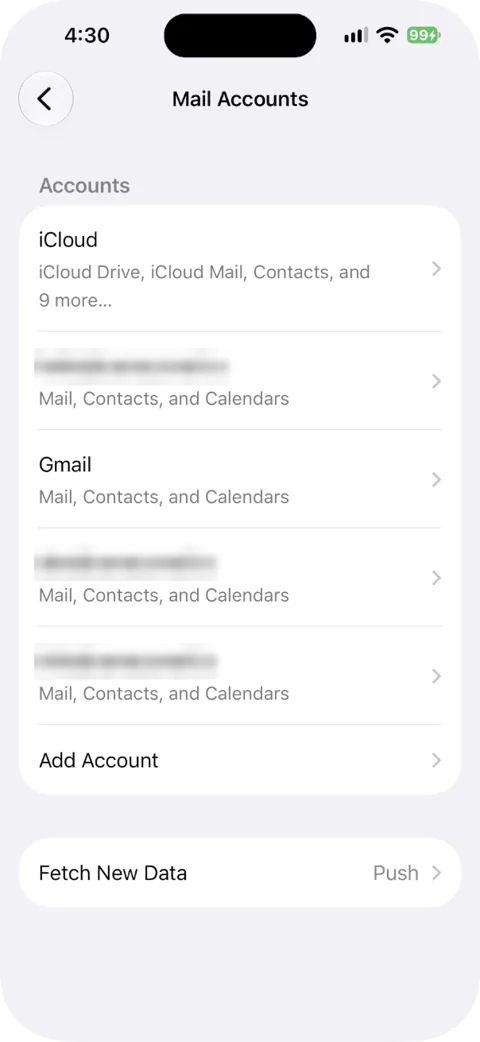
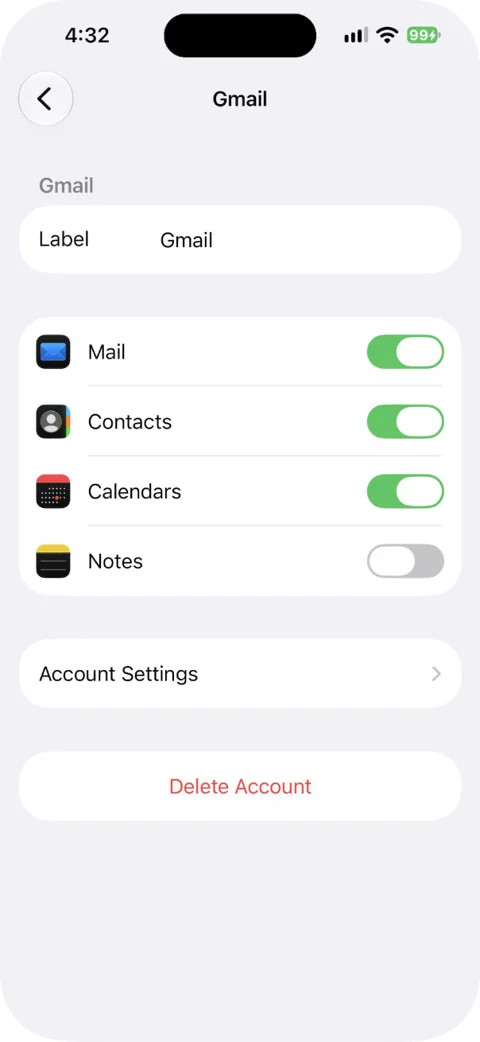
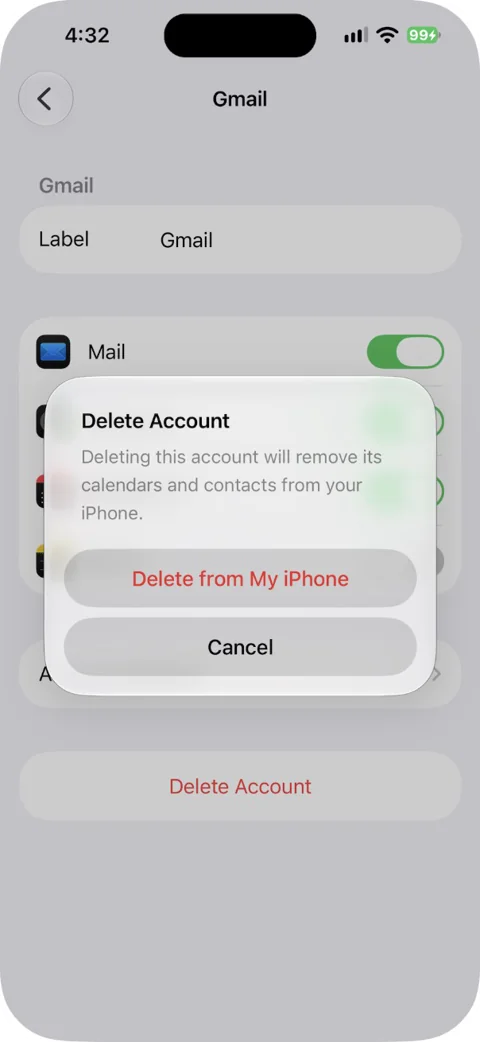
Can't find Mail? "Apps" sits at the very bottom of Settings, which is easy to miss. On iOS 17 and earlier, the path is Settings > Mail > Accounts, then tap the account and Delete Account.
Before you delete: if the account uses POP, or you aren't sure, sign in to its webmail and check your mail is there. Apple warns that deleting an account can remove emails already downloaded to the iPhone, and an iPhone backup saves your Mail settings, not your emails.
Delete or turn off: which to choose
| You want to | Do this | What happens |
|---|---|---|
| Take a break from an account | Turn off Mail for that account (for iCloud, turn off Use on this iPhone) | It stops sending and receiving on this iPhone; turn it back on any time |
| Keep its contacts and calendars but not its mail | Turn off Mail only and leave the other switches on | Mail goes away; contacts and calendars keep syncing |
| Remove it from this iPhone | Delete Account | The account and everything it synced leave the iPhone; the server keeps its copy |
| Fix an account that won't send or receive | Delete Account, then add it again | A clean setup; this is Apple's own fix |
| Close the email address for good | Close it with your provider | The account and its mail are deleted everywhere (after the provider's grace period) |
If you're removing accounts because Mail feels crowded, another route is an app with a unified inbox. Canary Mail (2M+ users) lets you keep every account but read them in one place. Disclosure: we make Canary Mail. Our list of the best email apps for iPhone covers the alternatives.
What gets deleted when you remove an account
- The account leaves Mail and every app that uses it on this iPhone.
- Contacts, calendars, reminders and notes that sync from that account disappear from this iPhone too. For example, a work Exchange account can sync all of these. The copies on the server stay.
- Your mail on the server stays. IMAP, Exchange, Gmail, Outlook.com, Yahoo and iCloud keep mail on the server, so you still see it in webmail and on your other devices.
- POP is the risk. A POP account downloads mail to the phone, and the server may not keep a copy. If this iPhone held the only copy, deleting the account deletes those emails.
- Unsent mail. Send or copy anything sitting in that account's Drafts or Outbox first.
- The account itself isn't cancelled. Your address keeps working, and you can add it back later.
Remove iCloud Mail from iPhone
iCloud works differently, because it's tied to your Apple Account. To stop iCloud Mail on this iPhone:
- Go to Settings > [your name] > iCloud.
- Tap Mail and turn off Use on this iPhone.
Don't sign out of your Apple Account just to get rid of iCloud Mail. Signing out also turns off iCloud Photos, iCloud Keychain, Find My, Apple Pay and iCloud Backup, among others, on that device.
Remove a work (Exchange) account
The steps are the same: Settings > Apps > Mail > Mail Accounts, tap the account, Delete Account. Remember that an Exchange account can sync Mail, Contacts, Calendars, Reminders and Notes, so all of those leave the iPhone with it.
If you only want less work mail on your phone, there are gentler options. Turn off the Mail switch and keep the calendar, or tap Mail Days to Sync and choose a shorter period.
Some work accounts are installed by a configuration profile from your employer or school. You'll see those profiles in Settings > General > VPN & Device Management. Deleting a profile also deletes every setting, app and piece of data that came with it, so ask your IT team before you do it.
Can't delete the account? Try these
- Screen Time restrictions. The Accounts restriction in Screen Time can also block account changes. If account options are greyed out, go to Settings > Screen Time > Content & Privacy Restrictions, tap Allow Changes to Settings (under Privacy Restrictions), tap Accounts and set it to Allow. You may need the Screen Time passcode. On a child's device in Family Sharing, a parent has to do this.
- It's managed by your work or school. An account installed by a configuration profile usually can only be removed with its profile. Ask IT.
- It's iCloud. Use the iCloud Mail switch described above.
- It's a contacts or calendar account. Accounts added only for contacts or calendars live in Settings > Apps > Contacts > Contact Accounts or Settings > Apps > Calendar > Calendar Accounts.
- Nothing else works. Restart the iPhone and try again.
How to delete the email account itself (not just from iPhone)
Removing an account from the iPhone never closes it. To delete the address and its mail for good, do it with your provider, and download anything you want to keep first.
- Gmail: in your Google Account, go to Data & privacy and choose Delete a Google service to delete only Gmail (you'll need another email address to keep the Google Account), or delete the whole Google Account. Google explains both in how to delete your Google Account.
- Outlook.com or Hotmail: closing the address means closing your Microsoft account, which also ends access to OneDrive, Xbox and other Microsoft services. You get a 30 or 60 day window to change your mind. See how to close your Microsoft account.
- Yahoo: cancel any subscriptions, then use Yahoo's account termination page. In most countries you can reactivate within 30 days. See close or reactivate your Yahoo account.
- iCloud: your @icloud.com address belongs to your Apple Account. To stop using it, turn off iCloud Mail on each device.
Remove an email account on iPad
It's the same on iPad: Settings > Apps > Mail > Mail Accounts, tap the account, then Sign Out or Delete Account. It doesn't cancel the account. For iCloud, the switch reads Use on this iPad.
Add it back later
Changed your mind? Go to Settings > Apps > Mail > Mail Accounts > Add Account, type the address and sign in (full steps: how to add an email account to iPhone). Mail stored on the server downloads again. If you also use a Mac, here's how to remove an account from Mail on a Mac, and our Apple Mail guide covers Mail on every Apple device.
Sources
- Apple: Add and remove email accounts on iPhone
- Apple: Add and remove email accounts on iPad
- Apple: If you can't receive email on your iPhone or iPad
- Apple: Set up Exchange ActiveSync on your iPhone or iPad
- Apple: Set up iCloud Mail on all your devices
- Apple: Sign out of your Apple Account and iCloud
- Apple: If you can't sign out due to restrictions
- Apple: Install or remove configuration profiles on iPhone
- Apple: Set up mail, contacts and calendar accounts on iPhone
- Yahoo: Set up or remove a Yahoo Mail account in the iOS Mail app
FAQ
How do I delete one email account from my phone and keep the others?
Go to Settings > Apps > Mail > Mail Accounts and tap only the account you want gone, then tap Delete Account. Your other accounts aren't touched.
Does deleting an email account from my iPhone delete my emails?
It deletes them from the iPhone, not from the server. With IMAP, Exchange, Gmail, Outlook.com, Yahoo or iCloud, your mail is still in webmail and on your other devices. With a POP account, the iPhone may hold the only copy, so check webmail first.
Why can't I delete my Mail account on my iPhone?
One common cause is Screen Time: set Settings > Screen Time > Content & Privacy Restrictions > Allow Changes to Settings > Accounts to Allow. Other causes are an account installed by your work or school's configuration profile, or an iCloud account, which you turn off under Settings > [your name] > iCloud > Mail instead.
How do I sign out of Mail on my iPhone?
Mail has no sign-out button of its own. To stop an account temporarily, turn off its Mail switch under Settings > Apps > Mail > Mail Accounts. To remove it, tap Sign Out or Delete Account on the same screen.
How do I permanently delete an email account?
Close it with your email provider: Google, Microsoft, Yahoo or whoever runs the address. Removing it from your iPhone only takes it off the phone.
Will removing the account delete my contacts and calendars?
It removes the contacts, calendars, reminders and notes that sync from that account from your iPhone. They stay on the server and come back if you add the account again. If you want to keep them on the phone, turn off just the Mail switch instead.