To delete a Gmail account, open myaccount.google.com, go to Data & privacy and pick one of two options. To delete only Gmail and keep your Google Account (YouTube, Drive, Photos, Play purchases), choose Remove data from services you no longer use, then Delete next to Gmail. To delete everything, choose Delete your Google Account at the end of the same list. Download your data with Google Takeout first. If you only want the account off your phone or computer, don't delete anything: sign out, or remove the account from the device.
The steps below cover a computer, Android and iPhone, using the labels Google Help shows in October 2026. For everything else about your account and inbox, see our complete guide to Gmail.
Delete Gmail, delete your Google Account, or just remove it from a device?
"Delete my Gmail account" can mean three different things. Pick the right one before you start. Two of them are hard to undo.
| What you do | What goes | What stays | Can you undo it? |
|---|---|---|---|
| Delete only the Gmail service | Your Gmail address and emails (Gmail deletes emails and settings after 30 days) | Your Google Account, YouTube, Drive, Photos, Play purchases. You sign in with a non-Gmail address instead | Sometimes. You may get the address back, but older emails may be gone |
| Delete the whole Google Account | Everything: Gmail, Drive files, Photos, Calendar, contacts, YouTube and Play purchases, subscriptions | Your other Google Accounts, if you have more than one | Only for a limited time. Google doesn't publish how long |
| Remove the account from a phone or computer | The account's mail, contacts and settings on that one device | The account itself and all its data. You can sign in again anytime | Yes, just sign in again |
If you want to stop using an old address but keep your YouTube channel or Google Play purchases, delete only Gmail. If you want Google to have nothing of yours under that account, delete the Google Account. If you're selling a phone or just don't want the inbox on it, remove the account from the device.
Before you delete: download your data and move your sign-ins
Do these first. Once the account is gone, you can't go back for a forgotten file or a bank login that still uses the old address.
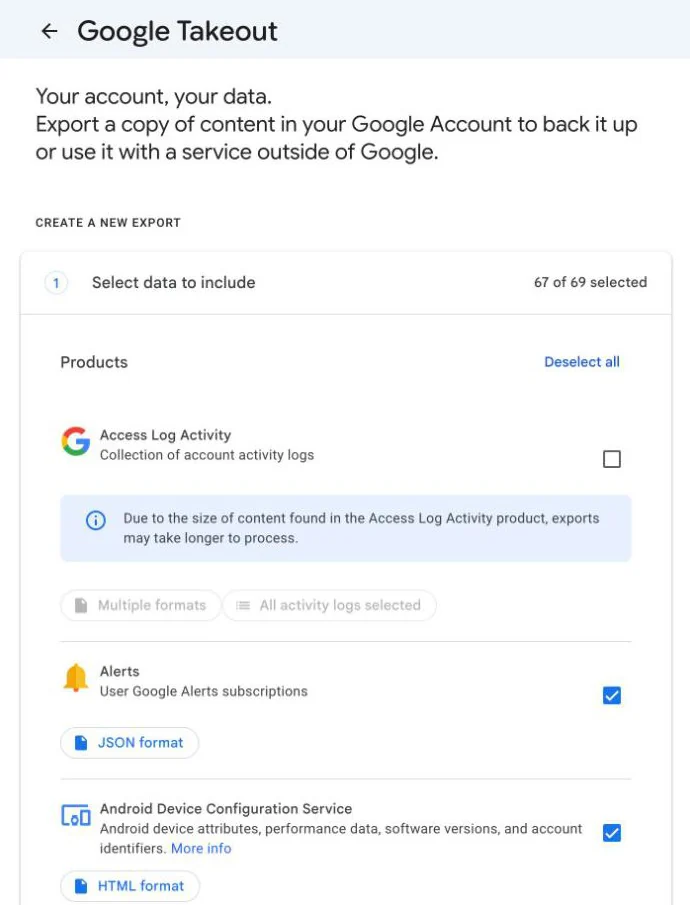
- Download your data with Google Takeout. Go to takeout.google.com while signed in. Products that hold your data are already selected; uncheck any you don't need, select Next step, choose a delivery method (an email link, Drive, Dropbox, OneDrive or Box) and select Create export. Most people get the download link the same day, but a large account can take a few days. The link expires after about 7 days.
- Don't save the archive to the Drive you're deleting. If you plan to delete the whole Google Account, download the archive to your computer or another storage service first.
- Change your email on other sites. If you use the Gmail address for your bank, social media, Apple ID or other apps, switch them to another address. Password-reset emails sent to a deleted address go nowhere.
- Update your recovery info. Add a recovery phone number and a non-Gmail recovery email, in case you change your mind and need to recover the account.
- Hacked account? Run Google's Security Checkup before deleting. Once the account is gone, you can't check what the hacker accessed, such as saved passwords or Google Wallet payments.
How to delete only Gmail and keep your Google Account
This removes your Gmail address and inbox but keeps the Google Account, so YouTube, Drive, Photos and your Play purchases still work. You need a different email address that isn't a Gmail address (for example, an Outlook, iCloud or work address). It becomes your new sign-in.
On a computer
- Open Gmail. At the top right, click your profile picture, then Manage your Google Account.
- On the left, click Data & privacy.
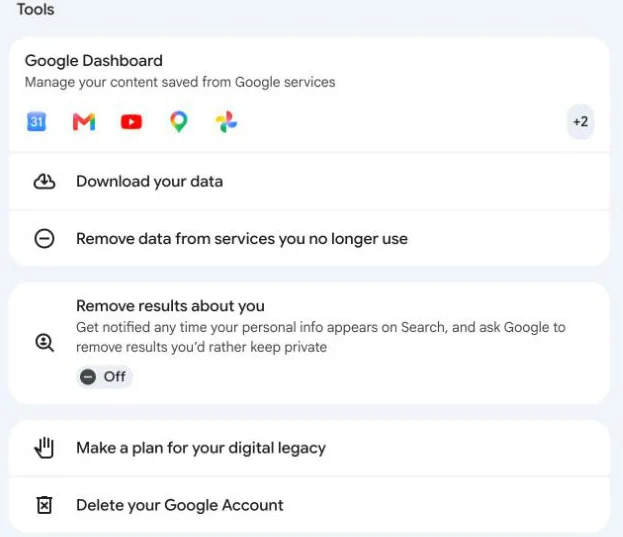
- Scroll to the Tools section and click Remove data from services you no longer use. This opens the "Delete a Google service" page.
- Sign in again if asked.
- Next to Gmail, click Delete.
- Enter the alternate (non-Gmail) email address and click Next.
- Open the verification email Google sends to that address and confirm it.
Nothing is removed until you verify the alternate address. If you never click the link, your Gmail stays.
On Android
- Open the Gmail app. At the top right, tap your profile picture, then Manage your Google Account.
- Tap Data & privacy, then scroll to Tools.
- Tap Remove data from services you no longer use and sign in.
- Next to Gmail, tap Delete, enter your alternate email address and tap Next.
- Verify the address from the email Google sends.
On iPhone or iPad
The steps are the same in the Gmail app for iPhone: tap your profile picture, then Manage your Google Account > Data & privacy, scroll to Tools, tap Remove data from services you no longer use, sign in, tap Delete next to Gmail, enter the alternate address and tap Next. Then verify it from your other inbox.
After you verify, you can't send or receive mail with that Gmail address, and Gmail deletes your emails and settings after 30 days.
How to delete your Google Account permanently
This deletes the Gmail address along with everything else in the account. If you have several Google Accounts, only the one you're signed in to is deleted.
On a computer
- Go to myaccount.google.com and sign in to the account you want to delete. Check the address at the top right.
- Click Data & privacy.
- Scroll to the Tools section.
- Click Delete your Google Account, the last item in that list.
- Sign in again if asked, read what will be deleted, and follow the steps on the screen to confirm.
Google also links straight to the deletion page at myaccount.google.com/deleteaccount.
On Android or iPhone
- Open the Gmail app and tap your profile picture. Make sure the right account is selected.
- Tap Manage your Google Account, then Data & privacy.
- Scroll to Tools and tap Delete your Google Account.
- Follow the steps on the screen.
You can also do it in any phone browser at myaccount.google.com.
What you lose
- All emails, files, calendars, photos and contacts stored only in the account.
- Access to Google services you sign in to with that account, like Gmail, Drive, Calendar and Play.
- Subscriptions and content bought on YouTube or Google Play: apps, movies, games, music and TV shows.
- On an Android phone: you can't get or update apps from the Play Store with that account, you may lose game progress, and photos and files stop saving to Drive.
- On a Chromebook: you can't use Chrome apps or extensions for the deleted account.
How to remove a Gmail account from your phone or computer (without deleting it)
Removing an account from a device doesn't delete it. Your email stays on Google's servers and you can sign in again anywhere.
On a computer
- Open Gmail and click your profile picture at the top right.
- Click Sign out. If several accounts are signed in, click Sign out of all accounts.
Forgot to sign out on another computer, or lost a phone? Open your profile picture, then Manage your Google Account > Security & sign-in. In "Your devices", click Manage all devices, select the device or session and click Sign out. A device can show several sessions; sign out of each one.
On Android
- Open the Gmail app and tap your profile picture.
- Tap Manage accounts on this device, choose the account and tap Remove account.
This also signs you out of other Google apps on the phone, like Maps and YouTube. You can do the same in Settings > Passwords & accounts (on some phones it's called Users & accounts or Manage accounts): tap the account, then Remove account. If it's the only Google Account on the phone, you'll need your PIN, pattern or password.
On iPhone or iPad
- Open the Gmail app and tap your profile picture at the top right.
- Tap Manage accounts on this device, then Remove from this device.
If your Gmail is also in Apple's Mail app, remove it there separately in Settings. Our guide on how to delete an email account from iPhone Mail walks through it, including what happens to downloaded mail.
If you're thinking of deleting an account because several inboxes are hard to keep track of, you may not need to. See how to manage multiple Gmail accounts for switching accounts and setting a default.
What happens to your Gmail address after you delete it?
Google says a removed Gmail address can't be used by anyone in the future. Nobody else can sign up with it, and you can't create a new account with the same address either.
Can you get it back yourself? Google's main Gmail Help page says that even after you remove your Gmail address you can recover it, though if it's been a while you might not get your emails back. An older Google Account Help page says that once you delete your Gmail username, you can't get it back. Our advice: treat deletion as permanent, and think of recovery as a backup plan you hope not to need.
If you want a fresh start, you can create a new Gmail account with a different username. If all you need is a separate address for sign-ups or newsletters, a Gmail alias using the dot or plus trick might do the job without a second account.
Can you recover a deleted Gmail account?
Often, if you act quickly. How long you have depends on what you deleted.
- Only Gmail (Google Account kept): open Gmail on your device, sign in to your Google Account and follow the steps on the screen. Gmail deletes the emails and settings after 30 days, so after that you may get the address back without your old mail.
- The whole Google Account: go to Google's account recovery page, enter the deleted address and answer the questions. Google says you might be able to recover it "within a certain amount of time", and that an account deleted a while ago may not be recoverable. Google doesn't publish an exact number of days. Other sites quote 2 to 3 weeks or 20 to 30 days, but those figures don't come from Google, so don't wait.
Recovery tips from Google: use a device and browser you usually sign in with, from a familiar location, and answer every question, even with a best guess. Wrong guesses don't lock you out, and you can try as many times as you need. Google won't recover accounts by phone, so ignore anyone who offers to do it for you.
If you recover the account, set a new password you haven't used with it before.
Work, school and child accounts
Google Workspace and school accounts
If your address ends in your company's or school's domain (or your Gmail is managed by an organization), you can't delete it yourself. Only the administrator can. The admin can also restore a deleted user for up to 20 days. After that, any data that wasn't transferred to someone else is gone for good. Ask your IT team, and download anything personal before you leave.
A child's account in Family Link
A parent can delete a child's Google Account if they created it and the child is under 13 (or the age that applies in your country). Older children can delete their own account.
- First, remove the child's account from any Android phone or Chromebook they use. If you delete the account while it's still signed in, the device may lock and need a factory reset.
- On your phone, open the Family Link app and select your child.
- Tap Controls > Account settings > Delete account and follow the steps.
On a computer, the same option is at Family Link under Controls > Account settings > Delete account. You have a limited time to restore the account. If you also deleted your family group, the child's account can't be restored.
Why can't I delete my Gmail account?
- There's no Delete option next to Gmail. The account is probably managed by a work, school or other organization. Contact the administrator.
- Google won't accept the alternate address. It can't be another Gmail address. Use an address from a different provider.
- Your Gmail is still there. You haven't verified the alternate address yet. Check that inbox, including spam, for Google's verification email.
- You can't sign in to the account you want to delete. Recover it first with Google's account recovery steps, then delete it.
- The wrong account got deleted. Start recovery right away. Your other Google Accounts are not affected.
- A phone locked after deleting a child's account. The account was deleted before it was removed from the device. The device may need a factory reset.
For more account and inbox how-tos, go back to our complete guide to Gmail.
Frequently asked questions
Can you delete a Gmail account?
Yes. You can delete only Gmail and keep your Google Account, or delete the whole Google Account. Both are in your Google Account under Data & privacy.
What happens when you delete a Gmail account?
You can no longer send or receive email at that address, and Gmail deletes your emails and settings after 30 days. If you delete only Gmail, your other Google services keep working.
If I delete my Gmail account, can someone else use the address?
No. Google says a removed Gmail address can't be used by anyone in the future, including you on a new account.
How long do I have to recover a deleted Gmail account?
Google doesn't give a number. It says you might be able to recover a deleted account within a certain amount of time, so start recovery as soon as possible.
Does deleting Gmail delete my YouTube account?
Not if you delete only the Gmail service. Deleting the whole Google Account removes YouTube access and anything bought on YouTube or Google Play.
Will removing my Gmail account from my phone delete it?
No. Removing it from a phone only takes it off that device. Your account and emails stay, and you can sign in again later.
How do I delete one Gmail account and keep the others?
Sign in to the account you want to delete and delete it from Data & privacy. Deleting one Google Account doesn't delete your other accounts.
Will Google delete my Gmail account if I don't use it?
It can. Google may delete an account that has been inactive across Google for at least two years. Sign in now and then to keep it.
Sources
- Google Account Help: Delete your Google Account
- Gmail Help: Remove Gmail from your Google Account
- Google Account Help: Remove products
- Google Account Help: 'Gmail upgrade confirmation' email
- Google Account Help: How to download your Google data
- Gmail Help: Sign out of or remove your account from Gmail
- Android Help: Add or remove an account on Android
- Google Account Help: Recover a recently deleted Google Account
- Google Account Help: Tips to complete account recovery steps
- Google Account Help: How to recover your Google Account or Gmail
- Google Workspace Admin Help: Delete or remove a user from your organization
- Google For Families Help: Restore, remove, or delete your child's Google Account