Disclosure: we make Canary Mail. We've tried to compare it with Proton Mail as fairly as we would two products we don't make, and we say where Proton is the better choice. Proton's prices and features were checked on proton.me on October 16, 2026.
Short answer: they aren't the same kind of product. Proton Mail is an email provider: you get a new @proton.me address, and your mailbox is encrypted so Proton can't read it. Canary Mail is an email app: it works with the Gmail, Outlook, iCloud, Yahoo or work account you already have and adds AI, tracker blocking and optional PGP encryption on top. Pick Proton if the strongest default privacy matters most and you're willing to change address. Pick Canary if you want to keep your addresses, manage several accounts in one inbox, or want AI help with email.
Canary Mail vs Proton Mail at a glance
| Canary Mail | Proton Mail | |
|---|---|---|
| What it is | Email app for the accounts you already have | Email provider with its own addresses and apps |
| Accounts | Gmail, Outlook, Microsoft 365, Exchange, iCloud, Yahoo, any IMAP | Proton addresses; can also connect Gmail addresses (1 free, up to 3 paid) |
| Encryption by default | Your provider's own (usually not end-to-end) | Zero-access storage; end-to-end between Proton users |
| Encrypting mail to anyone | PGP or SecureSend link (Pro+) | Password-protected emails (all plans) |
| AI | Writing and summaries (Growth); AI inbox sorting on every plan | Proton Scribe writing assistant (add-on or bundles) |
| Tracker blocking | On by default | Yes |
| Platforms | Mac, iPhone, iPad, Windows, Android | Web, iPhone, iPad, Android, Mac, Windows, Linux |
| Free plan | Unlimited accounts on 2 devices | 1 address, up to 1 GB, 150 messages a day |
| Paid | Growth $36/year; Pro+ $100/year; lifetime $100 / $300 | Mail Plus $47.88/year; Unlimited $119.88/year |
Provider vs app: the difference that decides it
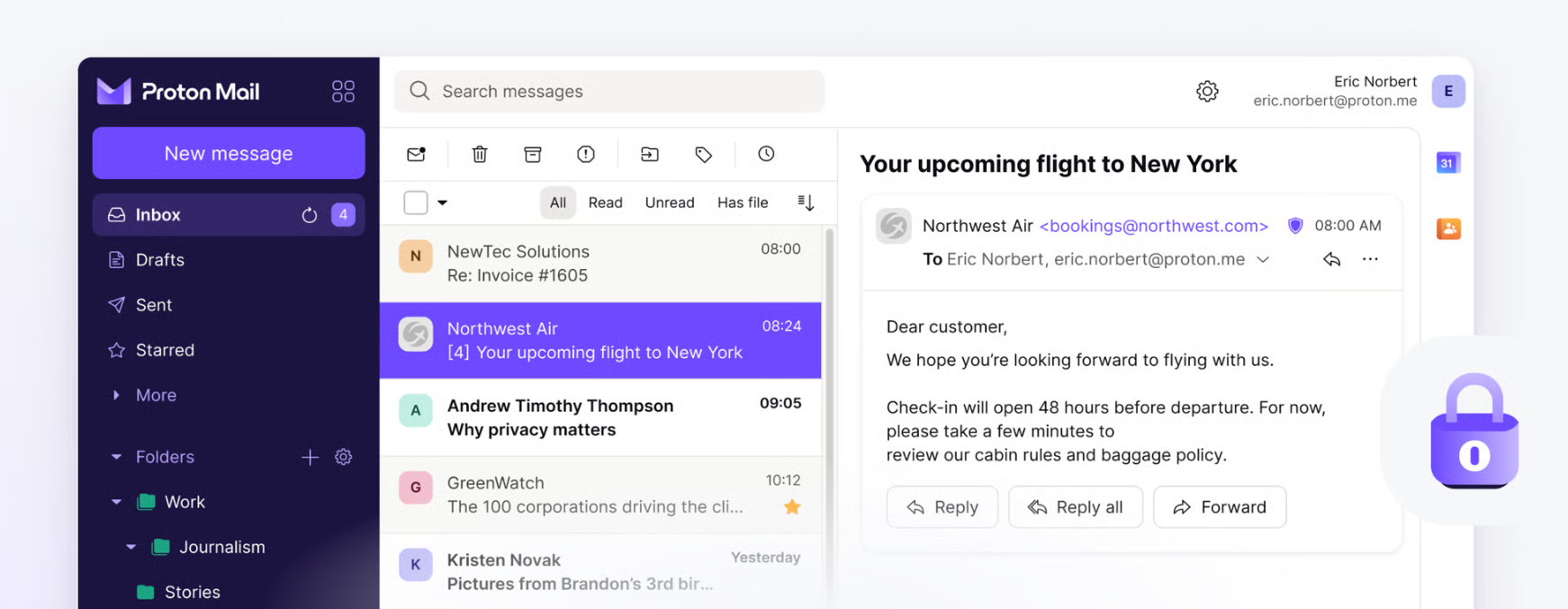
When you choose Proton, you're choosing where your email lives. Proton stores your mailbox on its servers in Switzerland with zero-access encryption, so incoming mail is encrypted with your key and Proton can't read it afterwards. You read it in Proton's own web, phone and desktop apps.
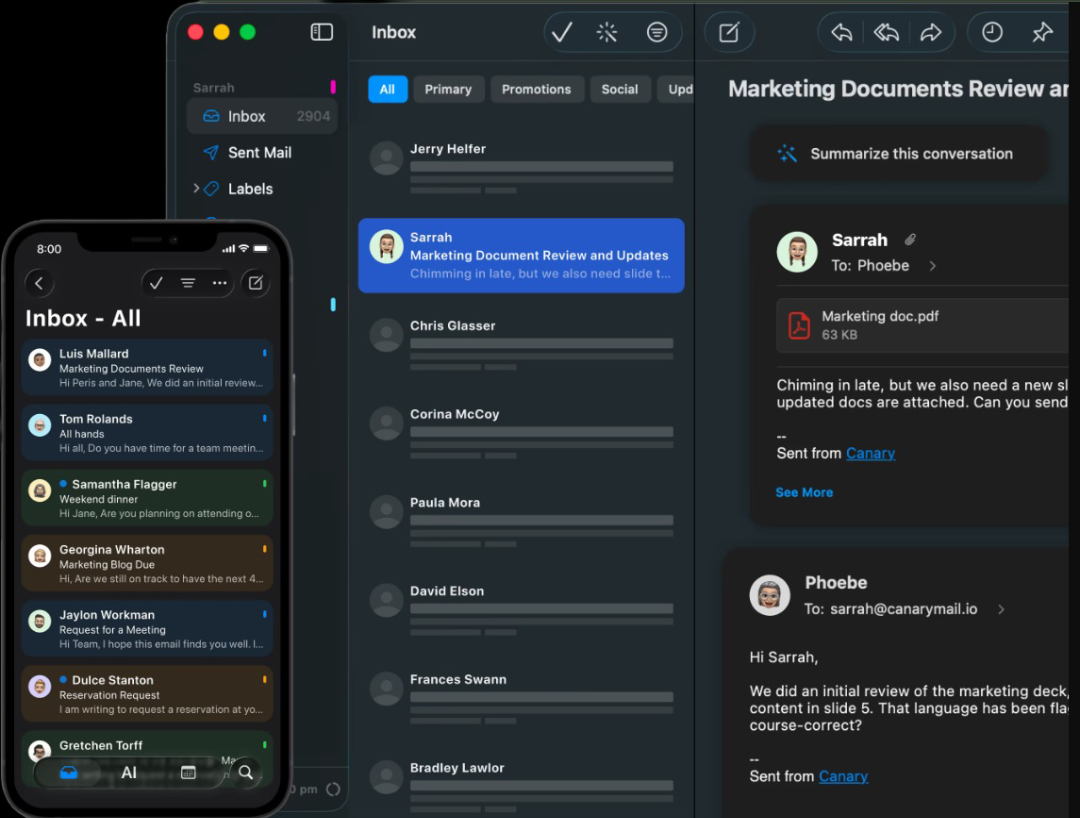
When you choose Canary, your email stays where it is now, with Google, Microsoft, Apple, Yahoo or your company's server. Canary is the app you read it in, on Mac, iPhone, iPad, Windows and Android. That means it can put all your accounts in one inbox, but it also means your stored mail is only as private as your provider makes it.
Verdict: If you want to leave Gmail or Outlook behind, that's a job for Proton. If you want to keep them and work faster, that's a job for Canary.
Encryption and privacy
Proton is the stronger choice for privacy by default. Every Proton plan encrypts your stored mail, messages to other Proton users are end-to-end encrypted automatically, and you can send password-protected emails to anyone else. Two limits are worth knowing: mail to non-Proton addresses isn't end-to-end encrypted unless you use a password, and subject lines aren't end-to-end encrypted. Proton will also sign a HIPAA business associate agreement for any user.
Canary blocks tracking pixels in every inbox by default. On the Pro+ plan you can encrypt any message end to end with OpenPGP, which works with anyone who uses PGP, whatever app they use, or send it through SecureSend: a secure link with identity verification, an expiry date and the option to revoke it. Pro+ also adds phishing and impersonation detection. Canary says it is HIPAA and GDPR compliant. Messages you don't encrypt are stored by your provider as usual.
For background, see secure email provider vs secure email client and PGP vs SecureSend.
Verdict: Proton, for encryption without having to think about it. Canary, if you need to encrypt messages from an address you can't change.
AI features
Proton's AI writing assistant, Proton Scribe, drafts and rewrites emails. It's included with Proton Duo, Family and Visionary, is a paid add-on for business plans, and can be tried free for 14 days on other paid Mail plans. It runs either on Proton's servers, where Proton says prompts are deleted after use, or as a 3.8 GB model on your own device (English only).
Canary's AI drafts replies, rewrites, summarizes long threads and sorts your inbox. Inbox sorting is free on every plan; writing and summaries are on Growth ($36 a year). Triage and indexing run on your device, and Canary doesn't use your email to train AI models.
Verdict: Canary, for more AI across more accounts at a lower price. Proton, if you want the option of a fully local model.
Multiple accounts
Canary was built for people with several addresses: work and personal Gmail, an Outlook account and a school or IMAP account all sit in one unified inbox with one set of notifications.
Proton is centered on Proton addresses. Its Easy Switch tool can connect a Gmail address so you send and receive it inside Proton (one on the free plan, up to three on paid plans), but not Google Workspace or custom-domain Gmail accounts, and mail you send from that Gmail address to non-Proton people goes through Google without end-to-end encryption. For Outlook, Yahoo and iCloud, Proton offers importing rather than a live connection.
More in our guide to the best email apps for multiple accounts.
Verdict: Canary.
Apps and platforms
Proton has apps for iPhone, iPad and Android, desktop apps for Mac, Windows and Linux (included on paid plans; free users get a 14-day trial), and webmail. To use Proton in another email app, such as Apple Mail, Outlook or Canary on a computer, you need Proton Mail Bridge, a desktop app for Mac, Windows and Linux that's only available on paid plans.
Canary runs on Mac, iPhone, iPad, Windows and Android. Its calendar is full-featured on Mac, iPhone and iPad, works with Gmail calendars on Windows, and isn't on Android yet; Proton includes Proton Calendar on every plan.
Verdict: Proton has more platforms, including Linux and the web. Canary has a native experience across Apple devices and every account you own.
Price
| Plan | Canary Mail | Proton Mail |
|---|---|---|
| Free | Unlimited accounts on 2 devices, AI sorting, basic read receipts | 1 address, up to 1 GB, 150 messages a day, 1 custom filter |
| Mid tier | Growth: $36/year or $100 once. AI writing and summaries, read receipts, send later, 5 devices | Mail Plus: $4.99/month or $47.88/year. 15 GB, 10 addresses, 1 custom domain |
| Top tier | Pro+: $100/year or $300 once. Adds PGP, SecureSend, phishing and impersonation detection | Unlimited: $12.99/month or $119.88/year. 500 GB, VPN, password manager, cloud storage |
| Billing | Yearly or lifetime; 7-day trial, no card | Monthly or yearly; 30-day money-back guarantee |
The prices aren't directly comparable, because Proton includes email hosting and storage while Canary uses the storage your current provider gives you. If you'd pay for Google or Microsoft storage anyway, Canary adds the least; if you want to stop paying them, Proton replaces them.
Can you use both?
On a computer, yes: with a paid Proton plan, Proton Mail Bridge lets desktop email apps reach your Proton mailbox, so Proton can sit next to your other accounts. Bridge is only made for Mac, Windows and Linux, so on your phone you'd still use Proton's own app for Proton mail. Many people simply keep Proton for sensitive mail and a client like Canary for everything else.
Which should you choose?
- Choose Proton Mail if you want a new, private address, encryption by default, Linux or web access, or a free encrypted mailbox. It's also the better pick for journalists, activists and anyone whose threat model includes their email provider.
- Choose Canary Mail if you can't or won't change your address, manage several accounts, want AI writing and summaries for $36 a year, or need to send encrypted email from Gmail, Outlook or a work account.
Still comparing? See Proton Mail alternatives, the best secure email apps and Canary Mail vs Gmail.
Frequently asked questions
Is Proton Mail more private than Canary Mail?
By default, yes. Proton encrypts your stored mailbox so it can't read it and encrypts mail between Proton users end to end. Canary leaves your mail with your existing provider and encrypts only the messages you choose to encrypt with PGP or SecureSend on Pro+. (We make Canary.)
Can Canary Mail replace Proton Mail?
Not fully. Canary is an app, not a provider, so it can't give you a Proton-style encrypted mailbox. It can replace Proton for people whose main need is encrypting some messages from an existing address.
Can I use my Proton Mail account in Canary Mail?
Proton only allows other email apps through Proton Mail Bridge, a desktop app for paid plans, and Bridge is only made for Mac, Windows and Linux. On a phone, Proton mail stays in Proton's own app.
Does Canary Mail support PGP encryption?
Yes, on the Pro+ plan ($100 a year), along with SecureSend for recipients who don't use PGP. It works with Gmail, Outlook, iCloud, Yahoo, Exchange and IMAP accounts.
Does Proton Mail have an AI email assistant?
Yes. Proton Scribe writes and rewrites emails. It's included in some bundles, sold as an add-on otherwise, and can run on Proton's servers or locally on your device.
Which is better for Mac and iPhone users?
Canary, if you want all your accounts in one native app with AI. Proton, if you want a single private Proton mailbox; its Mac app is included on paid plans.
Is Proton Mail free?
Yes, with one address, up to 1 GB of storage and 150 messages a day. Paid plans start at $4.99 a month or $47.88 a year.