Short answer: Missive is the closest Front alternative for small teams that want email and chat in one app, from $14 per user a month. Help Scout is the pick if you want a free plan, Hiver if your team works in Gmail, and Zendesk or Freshdesk if you need a full help desk. Shared Inbox by Canary (ours) is the cheapest option with AI built in, at $10 per user a month. Front itself now starts at $25 per seat a month billed yearly.
Disclosure: we make Shared Inbox by Canary, which is in this list. Prices were checked on each vendor's own pricing page on October 16, 2026, and are per user (or seat) per month unless noted.
What Front costs in 2026
Front is a customer operations platform built around a shared inbox. Teams handle email, chat, SMS and social messages together, with assignments, internal comments, shared drafts, rules and reporting. It runs on the web and has apps for Mac, Windows, iPhone and Android. Its current plans:
- Starter: $25 per seat a month billed yearly, $35 monthly, up to 10 seats. One channel type only (email, chat or SMS), up to 10 automation rules, basic analytics.
- Professional: $65 yearly, $85 monthly, up to 50 seats. Omnichannel, macros, up to 20 rules, advanced analytics, SSO.
- Enterprise: $105, yearly only. Unlimited rules, custom roles, and AI Copilot, QA and CSAT included.
- AI: Copilot is a $20 per seat add-on on Starter and Professional, and the Autopilot AI agent starts at $0.05 per conversation.
Every plan starts with a 14-day trial of Professional features, no card needed. There's no free plan.
Why teams look for a Front alternative
- Price per seat. At $25 to $105 a seat, plus $20 for Copilot, Front gets expensive quickly for a five- or ten-person team.
- Starter is limited. It covers one channel type and 10 rules, so teams that answer email and chat end up on Professional.
- Seat caps. Starter stops at 10 seats and Professional at 50.
- More than they need. Small teams that just want to share support@ often don't use Front's workspaces, analytics or AI agent.
- They live in Gmail. Some teams would rather keep working inside Gmail than learn a new app.
Front alternatives compared
| Tool | Best for | Starting price | Free plan or trial | Works with |
|---|---|---|---|---|
| Missive | Small teams that want email and chat together | $14 (yearly), $18 monthly | 30-day trial | Gmail, Outlook, iCloud, IMAP, SMS, WhatsApp |
| Help Scout | Support teams that want a free plan | Free; Standard $25 (yearly) | Free plan for 5 users | Email, chat, SMS, WhatsApp, social |
| Shared Inbox by Canary (ours) | Small teams that want AI on a budget | $10 | 14-day trial | Gmail, Microsoft 365, IMAP |
| Hiver | Teams that work in Gmail | $25 (yearly), $35 monthly | 7-day trial | Gmail, Outlook and others |
| Zendesk | Larger support teams | $19 per agent (yearly) | 14-day trial | Email, chat, phone, social |
| Freshdesk | Help desk on a budget | $19 per agent (yearly) | 14-day trial | Email, chat, phone, social |
| Gmelius | Google Workspace teams | $25 (yearly), $33 monthly | 7-day trial | Gmail and Google Workspace |
| Drag | The cheapest Gmail shared inbox | $12 (yearly), $16 monthly | 7-day trial | Gmail and Google Workspace |
| Heroic Inbox | WordPress sites | $199 a year, unlimited users | 14-day money-back | Gmail, Outlook, IMAP inside WordPress |
The 9 best Front alternatives and competitors in 2026
1. Missive: Best for small teams that want email and chat together
Missive is the closest like-for-like swap. It combines shared and personal inboxes with internal chat inside each conversation, drafts you write together, assignments and tasks, and it also connects SMS, WhatsApp and social accounts. It runs on the web, Mac, Windows, iPhone and Android.
- Who it's for: small teams that want Front's collaboration at a lower price
- Price: Starter $14 a month billed yearly ($18 monthly), up to 5 users; Productive $24 ($30), up to 50 users; Business $36 ($45); 30-day trial of Productive, no card
- Compared with Front: cheaper and simpler, with better internal chat, but lighter on reporting and ticketing
- Downside: rules, integrations, the API and AI start on Productive, and AI is paid separately through credits or your own API key.
If Missive is on your shortlist too, see our Missive alternatives.
2. Help Scout: Best free plan for support teams
Help Scout turns shared email into a clean help desk that still feels like email to customers. It has assignments, saved replies, automatic collision detection, a knowledge base (Docs), a chat widget and AI drafts and summaries on the higher plans.
- Who it's for: customer support teams that want a help desk without ticket numbers
- Price: free for up to 5 users, 1 inbox and 100 contacts a month; Standard $25, Plus $45 and Pro $75 per user a month billed yearly; 15-day trial, no card
- Compared with Front: a real free plan and a built-in knowledge base, but it's for customer support, not internal email
- Downside: AI drafts start on Plus, and AI Answers costs $0.75 per resolution on top.
3. Shared Inbox by Canary: Best for small teams that want AI on a budget

Disclosure: Shared Inbox by Canary is our product. It combines a shared inbox, internal chat and mentions, a built-in help desk with ticket status and assignment, shared templates, and an AI chatbot trained on your own help material that answers common questions. It connects Gmail, Microsoft 365 and IMAP accounts, and works on the web, Mac, Windows and iPhone, with Android on the way.
- Who it's for: small teams that want a shared inbox and an AI support assistant for less than Front's Starter plan
- Price: Starter $10 per user a month; Business $20; Scale $30; 14-day free trial of Scale features, no card needed
- Compared with Front: less than half the price per seat with an AI chatbot included, but no SMS or social channels and lighter reporting
- Downside: integrations, analytics and CSAT start on Business, the AI chatbot has a monthly response cap on each plan, and there's no Android app yet.
4. Hiver: Best for teams that work in Gmail
Hiver comes in two versions at the same price. Hiver in Gmail adds shared inboxes, notes with mentions, shared drafts, collision detection and AI to the Gmail window your team already uses. Hiver Omni is a separate app that works with Gmail, Outlook and other providers and adds chat, voice and self-service.
- Who it's for: Google Workspace teams that don't want a new app, or teams that want a full support platform
- Price: Growth $25 per user a month billed yearly ($35 monthly), Pro $55 ($65), Elite $85 ($95); plans start at 2 seats; 7-day free trial
- Compared with Front: nothing new to learn for Gmail users and AI included from Growth, but SLAs, CSAT and CRM integrations start on Pro
- Downside: the trial is short, and the Gmail version only makes sense if everyone is on Google.
5. Zendesk: Best for larger support teams
Zendesk is a full customer service platform: ticketing, email, chat, phone and social channels, a help center, workflows and deep reporting. Zendesk itself pitches its entry plan at teams that have outgrown a shared inbox.
- Who it's for: support teams that need SLAs, routing and reporting at scale
- Price: Support Team $19 per agent a month billed yearly ($25 monthly); Suite Team $55 ($69); Suite Professional $115 ($149)
- Compared with Front: more help desk power and channels, but it feels like a ticketing system rather than email
- Downside: the full suite gets expensive, and it takes longer to set up and learn than an inbox-style tool.
6. Freshdesk: Best help desk on a budget
Freshdesk is a multi-channel help desk with ticket assignment, automations, a knowledge base and reporting. It's a cheaper route to Zendesk-style ticketing than Front's Professional plan.
- Who it's for: support teams that want help desk features at a lower entry price
- Price: Growth $19 per agent a month billed yearly ($23 monthly); Pro $55 ($66); Enterprise $89 ($107); 14-day trial
- Compared with Front: stronger ticketing for less money, but less of the shared-email feel
- Downside: there's no free plan, and its Freddy AI Copilot costs extra per agent.
7. Gmelius: Best for Google Workspace teams that like kanban boards
Gmelius works inside Gmail, with shared inboxes and labels, shared drafts, collision detection, notes and mentions, kanban boards, automation rules, SLA tracking and an AI assistant.
- Who it's for: Google Workspace teams that manage email like a project board
- Price: Growth $25 per user a month billed yearly ($33 monthly), the first plan with shared inboxes; Pro $40 ($50); 7-day trial
- Compared with Front: stays in Gmail at a similar entry price, but no Outlook support
- Downside: Gmail and Google Workspace only, and the cheaper Meli plan is just the AI assistant, with no team features.
8. Drag: Best budget option for Gmail teams
Drag turns Gmail into a shared workspace where emails become cards on boards. Every plan has shared inboxes, assignments, mentions, notes, templates and collision detection, with unlimited users and no seat minimum.
- Who it's for: Gmail teams that want the cheapest way to share an inbox
- Price: Starter $12 per user a month billed yearly ($16 monthly); Plus $18 ($22); Pro $24 ($30); 7-day trial, no card
- Compared with Front: about half Front's entry price, but Gmail only and lighter reporting
- Downside: Gmail only, and its Varley AI isn't included on Starter.
9. Heroic Inbox: Best for WordPress sites
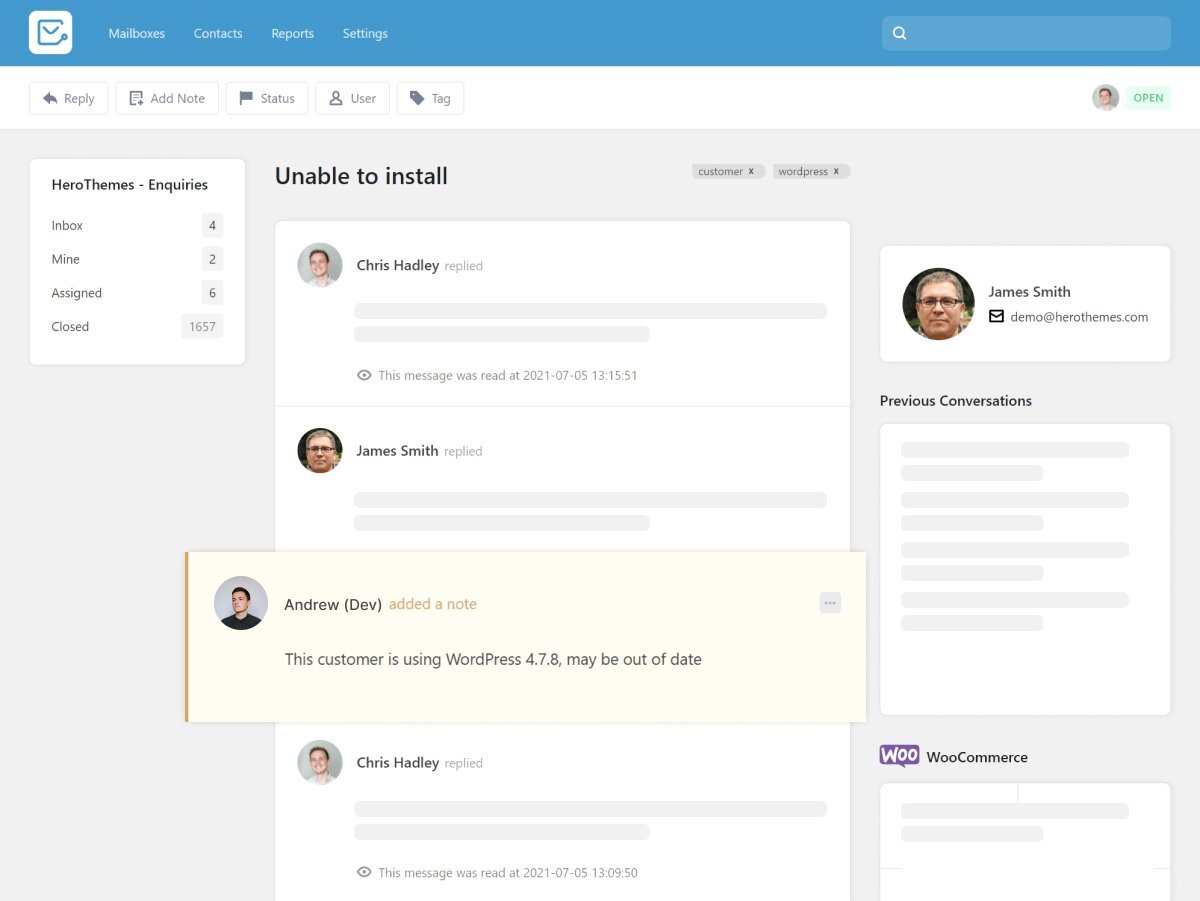
Heroic Inbox is a help desk plugin that runs inside your WordPress dashboard. It connects Gmail, Outlook or IMAP mailboxes and gives you a shared inbox with assignments, private notes, collision detection and tags, priced per site rather than per user.
- Who it's for: small businesses whose website and support both run on WordPress
- Price: Essential $199 a year for 1 site and 2 mailboxes, unlimited users and tickets (on sale for $99.50 when we checked); Plus and Pro cover more sites and mailboxes
- Compared with Front: flat yearly pricing instead of per-seat fees, but email only, with saved replies from the Plus plan
- Downside: it only works if your site runs on WordPress.
Free shared inboxes you may already have
Before paying for anything, check what your email provider includes. Google Collaborative Inbox turns a Google Group into a shared inbox where members can take, assign and resolve conversations, and it's included with Google Workspace. Microsoft 365 shared mailboxes are free up to 50 GB and support up to 25 users in Outlook. Neither has collision detection, shared drafts or reporting, which is usually when teams start looking at Front and the tools above.
What to look for in a Front alternative
- Help desk or shared inbox. Customer support teams need ticketing, SLAs and a knowledge base (Help Scout, Zendesk, Freshdesk). Teams that mostly discuss email need comments, shared drafts and assignment (Missive, Shared Inbox by Canary, Drag).
- Where your team works. Gmail teams can stay in Gmail with Hiver, Gmelius or Drag. Mixed providers need a separate app.
- Channels. If you rely on Front for SMS, WhatsApp or social, check that the replacement includes them on the plan you'd actually buy.
- Collision detection. Seeing that a teammate is already replying prevents double answers. Help Scout, Hiver, Gmelius, Drag and Heroic Inbox all have it.
- The real cost of AI. Some tools include AI in the seat price, others charge per seat or per resolution on top.
Our guides to the best shared inbox tools and shared inbox best practices go further.
How to move off Front
Front connects to mailboxes you already own, so your email stays with Google, Microsoft or your IMAP provider when you leave. Connect the same addresses to the new tool, recreate your rules and templates, and run both side by side for a week before you cancel. Comments, tags and analytics live in Front, so export anything you need to keep first.
Frequently asked questions
What is the best alternative to Front?
Missive for small teams that want email and chat together, Help Scout if you want a free plan, Hiver if your team works in Gmail, and Zendesk or Freshdesk for a full help desk. Shared Inbox by Canary is the cheapest of these with AI included, at $10 per user a month.
How much does Front cost?
Starter is $25 per seat a month billed yearly or $35 monthly, Professional $65 or $85, and Enterprise $105 on yearly billing only. Copilot adds $20 per seat on Starter and Professional. There's a 14-day trial and no free plan.
Is there a free Front alternative?
Yes. Help Scout has a free plan for up to 5 users and one inbox. If you use Google Workspace or Microsoft 365, Google Collaborative Inbox and Microsoft 365 shared mailboxes come with your plan.
What is the difference between Front and Zendesk?
Front feels like a team email client with help desk features added; Zendesk is a ticketing platform first. Zendesk is stronger for large support operations and has a cheaper entry plan, while Front is better when teams collaborate on email with customers and partners.
What are some good alternatives to Missive?
Front, Help Scout, Hiver and Shared Inbox by Canary cover most needs. Our Missive alternatives guide compares them in detail.
Who is Front best for?
Customer support, account management and operations teams that share addresses like support@ and need rules, reporting and several channels in one place. For a team of two or three, it's usually more than you need.