Built for clinicians who rely on email but can’t compromise on privacy
Therapists and clinicians use email every day to schedule sessions, share documents, and coordinate care. But most email apps were designed for speed and marketing - not for confidential clinical communication.
This secure email app for therapists and clinicians works with your existing email accounts, adds strong privacy protections, and helps you communicate clearly without creating friction for clients or colleagues.
With Canary Mail, you can:
- Use Gmail, Outlook, or clinic-hosted email with added security
- Encrypt sensitive messages with end-to-end encryption or PGP
- Send SecureSend messages that expire and require a password
- Block trackers and reduce unnecessary data exposure
Who this secure email app is for
This email app is built for professionals who handle sensitive client information every day.
- Therapists and counselors managing client communication by email
- Clinicians coordinating care with physicians and institutions
- Psychologists, psychiatrists, and social workers handling confidential records
- Group practices and clinics with shared devices or inboxes
[cta-block:ctablock1,title="Start Secure Email for Clinical Work",button="Try Canary Mail Free for Therapists and Clinicians",buttonlink="https://canarymail.io/downloads"]
Why default email clients fall short for therapists and clinicians
Standard email apps treat every message the same. For clinical work, that’s a problem.
Some emails involve scheduling or administration. Others include diagnoses, reports, or deeply personal information. When everything looks identical, it’s easy to send the wrong message the wrong way - or avoid email entirely for sensitive topics.
Common problems clinicians face with generic email apps
- No simple way to protect sensitive messages
Encryption often requires separate tools or awkward workflows, so important information ends up sent unprotected or delayed. - Hidden trackers in everyday email
Tracking pixels can reveal when or where messages are opened - an unacceptable risk in clinical relationships. - Shared devices with weak safeguards
Clinics often involve shared computers or quick handoffs, increasing the risk of exposed inboxes. - No distinction between routine and sensitive communication
Newsletters, referrals, and confidential client messages all sit side by side, increasing the chance of mistakes.
If email feels risky or stressful, it’s not because you’re doing something wrong - it’s because the tools weren’t built for clinical realities.
Why therapists and clinicians need a different kind of email app
Therapists and clinicians need an email app that protects sensitive client communication, clearly separates clinical from administrative messages, and makes it easy to use encryption and SecureSend when needed - not just send and receive emails.
What a secure email app for clinical work should include
Clinicians don’t need more complexity. They need an email app that protects privacy, reduces risk, and fits naturally into daily work.
Features that matter for therapists and clinicians
| Feature | Clinical outcome |
|---|---|
| End-to-end encryption and PGP | Sensitive client information stays protected without changing how you email |
| SecureSend for external recipients | Share reports and documents safely with clients and professionals who don’t use PGP |
| Tracker blocking and safer defaults | Protect client privacy by preventing invisible tracking and data leakage |
| Unified inbox with clear separation | Keep clinical, administrative, and personal email organized and distinct |
| AI summaries and draft assistance | Spend less time on scheduling and admin while keeping clinical judgment in your control |
| Strong privacy and access controls | Reduce risk when using shared devices or clinic inboxes |
1. Encryption that’s available when you need it
- Use end-to-end encryption for messages involving diagnoses, reports, or sensitive personal data.
- Enable PGP for colleagues and institutions that already rely on it.
- Choose when to encrypt, without disrupting routine communication.
Outcome: Sensitive information stays protected without turning email into a burden.
2. SecureSend for clients and external professionals
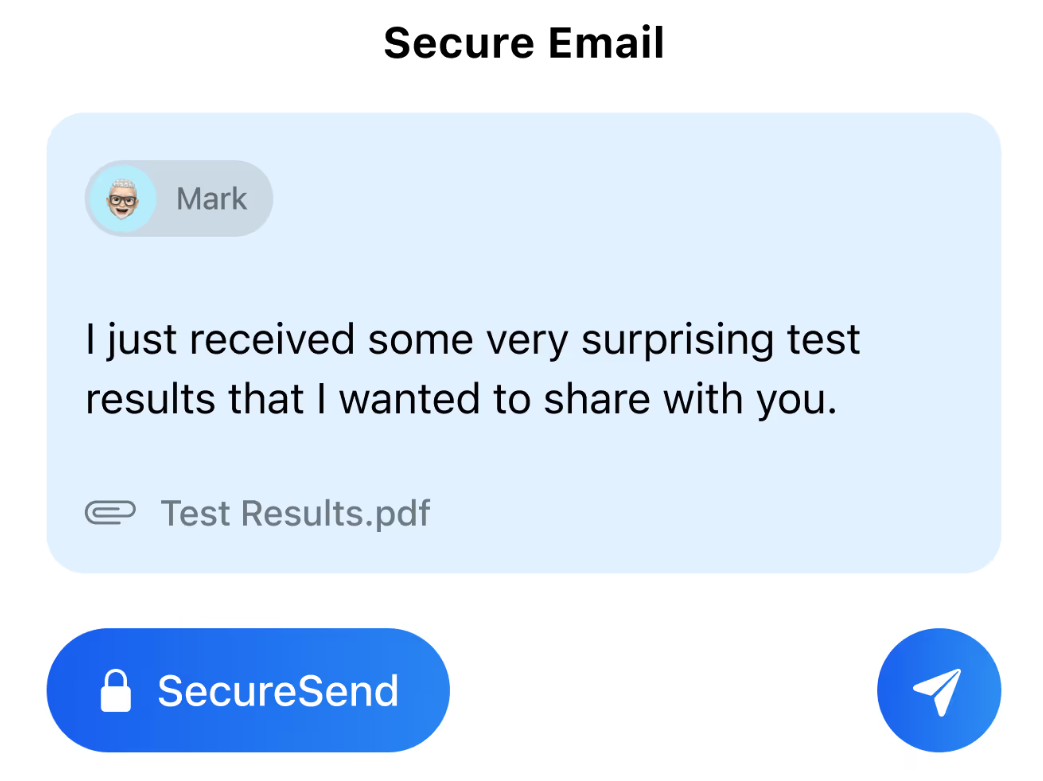
- Send password-protected, expiring messages to any email address - even if the recipient doesn’t use PGP.
- Control how long messages and attachments remain accessible.
- Reduce the risk of confidential documents sitting unprotected in inboxes forever.
Outcome: Safer sharing with clients and collaborators outside your system.
3. Tracker blocking and safer defaults
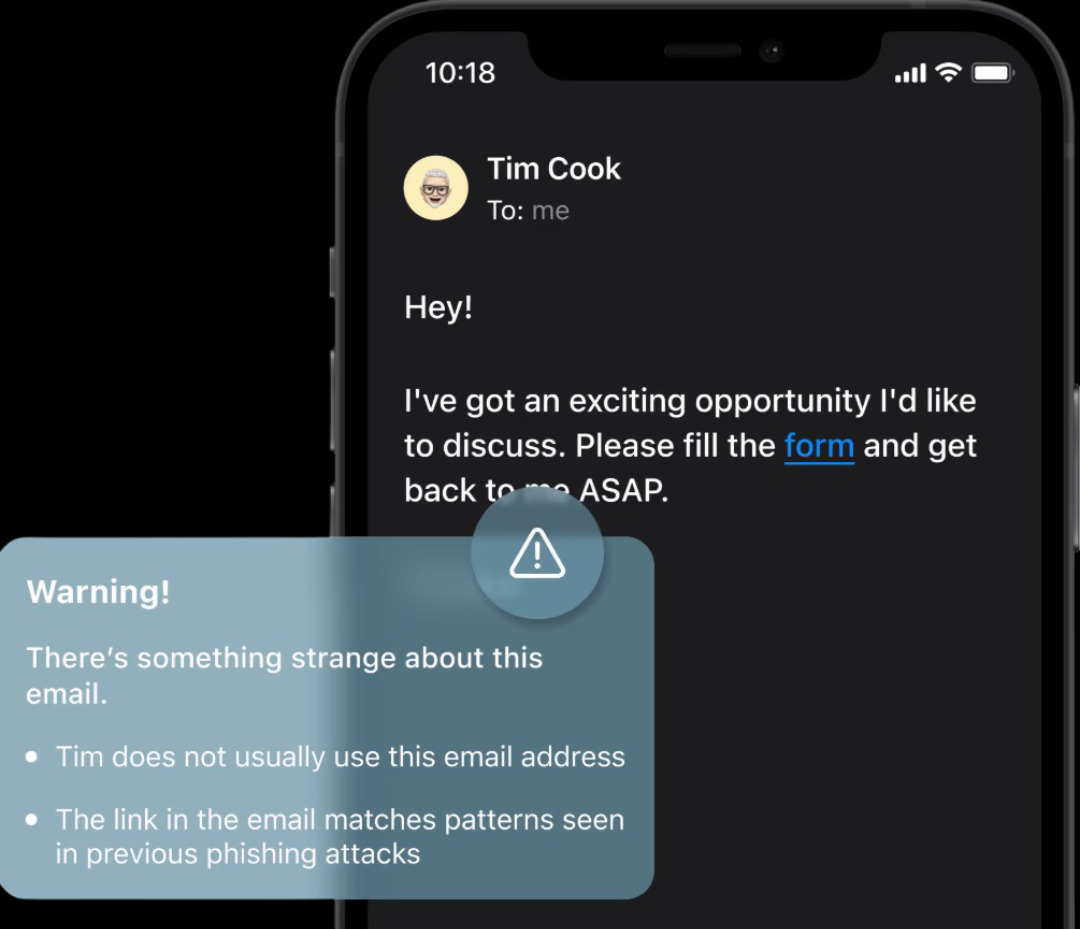
- Block tracking pixels in incoming emails automatically.
- Load remote content more safely to reduce data leakage.
- Minimize silent surveillance in your everyday inbox.
Outcome: More privacy for you and your clients, without extra effort.
4. Unified inbox with clear separation
- Combine personal, clinic, and institutional accounts in one app.
- Use labels, folders, or tags to separate client communication from administrative email.
- Keep sensitive threads clearly organized and easy to find.
Outcome:Less inbox chaos, fewer mistakes.
5. AI assistance used carefully and intentionally
- Summarize long administrative threads quickly.
- Draft scheduling or referral replies, then review and edit before sending.
- Keep full control over language, tone, and clinical judgment.
Outcome: Less time on admin, more focus on client care.
Email workflows that respect clinical boundaries
A secure email app should support how clinicians actually work - not force rigid systems.
1. Scheduling and rescheduling sessions
- Clients email to request appointments or changes.
- You or an assistant can respond with available slots and confirmations directly from the inbox.
- Routine scheduling stays simple and easy for clients.
- When an email includes personal details, you can switch to SecureSend or encryption to keep information protected.
This keeps communication smooth without oversharing.
2. Sharing documents and reports
- Send reports, referral letters, or treatment summaries using PGP or SecureSend.
- This prevents sensitive attachments from being stored unprotected across multiple inboxes.
3. Coordinating with other professionals
- Collaborate with physicians, psychiatrists, or other therapists using encrypted email when clinical detail is involved.
- Organize conversations by client or case so records stay clear and easy to review.
- This keeps collaboration efficient without switching between tools.
4. Managing boundaries and expectations
- Use saved replies for response times, availability, and emergency procedures.
- Let AI help draft neutral, professional administrative responses, then review and send in your own voice.
- Sensitive discussions can be moved into more appropriate channels when needed.
These workflows help you use email confidently while staying aligned with professional ethics
Why these workflows work
These inbox-first workflows help therapists and clinicians:
- Protect sensitive client communication
- Reduce the risk of privacy mistakes
- Keep clinical and administrative email clearly separateds
- Maintain professional boundaries and expectations
All without forcing clients or colleagues to change how they email.
Canary lets me communicate with clients confidently without worrying about privacy or complicated tools.
- Licensed Therapist
[cta-block:ctablock1,title="Turn these workflows into your daily support routine",button="Set up Canary Mail for Your Team",buttonlink="https://canarymail.io/downloads"]
Pricing that fits individual clinicians and clinics
A secure email app for therapists and clinicians should be easy to start and easy to scale.
- Individual practitioners can begin with a free or trial plan
- Paid plans add advanced security, multiple devices, and support
- Clinics and group practices can support multiple clinicians
See full details on the pricing page.
Quick start for clinical work (5 steps)
Getting set up takes minutes, not complex IT work.
- Install Canary Mail on your computer and phone
Download the app from the downloads page and sign in. - Connect your clinical and work inboxes
Add Gmail, Outlook, clinic-hosted email, and any administrative or institutional accounts. - Enable privacy-critical protections
Turn on PGP, SecureSend, and tracker blocking based on your policies and comfort level. - Organize clinical communication clearly
Create folders, labels, or tags for clients, referrals, and administrative topics. - Enable AI for administrative threads only
Use AI summaries and draft assistance for scheduling and admin emails, while keeping clinical content fully under your control.
You can run Canary Mail alongside your existing email client for a week, then switch fully once your workflow feels right.
Built to grow from one clinician to a full practice
For therapists and clinics, flexible pricing and multi-account support make it easy to add clinicians, assistants, or administrative staff without complex setup or IT overhead. Whether managing one private inbox or multiple clinic and institutional accounts, Canary Mail grows as your practice and workload grow.
[cta-block:ctablock3,title="Protect Client Communication",subtitle="Send, receive, and manage sensitive clinical email securely with Canary Mail",button1="Get Started Free for Clinical Work",button1link="https://canarymail.io/downloads",button2="Explore all features",button2link="https://canarymail.io/features"]
Secure email app for therapists and clinicians - FAQ
Do I need to change my email provider to use this secure email app?
No. You can keep your existing provider such as Gmail, Microsoft 365, or a clinic-hosted email account. Canary Mail works on top of your current provider and focuses on secure communication, privacy, and how you manage email day to day.
Can clients receive messages if they don’t use PGP?
Yes. SecureSend allows you to send password-protected, expiring messages to any email address. Clients receive a secure link, so sensitive information stays protected without requiring them to set up PGP.
How does AI help without affecting clinical judgment?
AI assists with summaries and draft suggestions for administrative email, not automated clinical communication. You review and edit every message, control tone and content, and decide exactly where AI fits into your workflow.
Does this automatically make my email compliant with regulations like HIPAA?
The app includes features such as encryption, SecureSend, and tracker blocking that support secure communication. Compliance depends on how the tool is configured and used, along with your broader policies and agreements. You should always assess requirements specific to your practice.
Can I use the same app for both clinical and non-clinical email?
Yes. You can connect multiple accounts and keep them organized with folders, labels, or tags. Many clinicians use one secure app to manage both clinical and non-clinical inboxes while keeping communication clearly separated.