Built for recruiters and HR teams: an email app for hiring and candidate communication
If you recruit or manage HR processes, your inbox is full of applications, referrals, interview scheduling, feedback, offers, and onboarding questions. You need to respond quickly, stay organized across roles, and keep candidates informed - without losing context or dropping follow-ups.
This email app for recruiters and HR teams centralizes all hiring inboxes, uses AI to speed up replies and summaries, and ensures every candidate and hiring manager stays aligned - securely.
An email app for recruiters and HR teams should:
- Bring all recruiting and HR inboxes into one unified view
- Use AI assistance to speed up replies and summarize long candidate threads
- Support shared inboxes and clear assignment for addresses like talent@ and hr@
Protect candidate and employee data with strong security and encryption
Who this email app is for
This email app is built for recruiters and HR teams managing high-volume candidate communication and optimizing candidate email workflows for faster hiring.
- Recruiters handling multiple open roles and candidate pipelines
- HR teams coordinating interviews, offers, and onboarding
Talent teams collaborating with hiring managers and agencies
[cta-block:ctablock1,title="Start Free Trial for Recruiting Teams",button="Try Canary Mail Free for Recruiting",buttonlink="https://canarymail.io/downloads"]
Why default email clients fail recruiting and HR teams
Standard email apps treat every message the same. Recruiting teams need to focus on candidates, interviews, and decisions - not newsletters and internal noise.
In a hiring inbox, some emails represent active candidates and time-sensitive decisions. Others don’t. When everything looks identical, good candidates wait too long or slip through the cracks.
Common problems recruiters face with generic email apps
- Candidates scattered across inboxes
Applications arrive in personal inboxes, shared addresses, and automated aliases. There’s no single place to see everyone in the pipeline. - No visibility into hiring stage
Who’s screening, interviewing, or waiting for feedback lives in spreadsheets or memory - not in the inbox. - Feedback lost across tools
Hiring managers reply in email, chat, or meetings. Context gets fragmented and decisions slow down. - Manual follow-up tracking
Without reminders, recruiters forget to send updates, collect feedback, or follow up on interviews. - Sensitive data mixed with noise
Candidate information and HR conversations sit alongside newsletters and notifications, increasing risk and distraction.
Recruiting teams need an email app that adds structure, visibility, and follow-up discipline - without forcing a heavy ATS into the inbox.
Why recruiters and HR teams need a different kind of email app
Recruiters and HR teams need an email app that shows candidate progress, interview status, and pending feedback - not just send and receive emails.
What a good email app for recruiting and HR should include
Recruiters don’t need more email features. They need an email app for recruiters and HR teams that keeps candidates moving, protects follow-ups, and preserves context across the hiring process.
Features that matter for recruiters and HR teams
1. Unified inbox with candidate-centric views
- Bring careers@, jobs@, hr@, and individual recruiter inboxes into one place.
- See all candidate conversations in a single unified inbox
- Filter by role, recruiter, location, or hiring stage
- Balance workloads so no role or recruiter gets overloaded
Outcome: Recruiters spend less time hunting for emails and more time moving candidates forward.
2. AI assistance for replies and summaries
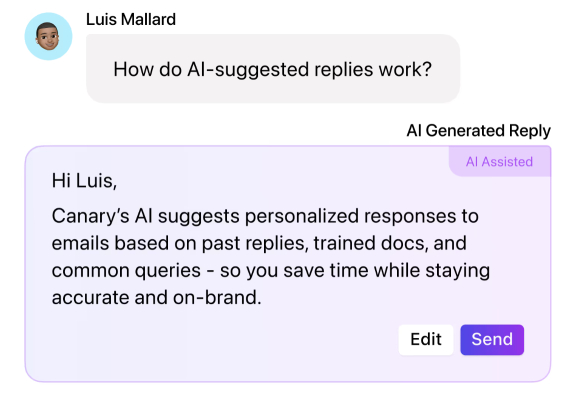
Hiring inboxes are full of repetitive questions and long threads. AI helps you respond faster without losing context.
- Use AI Draft replies for confirmations, screening questions, and polite rejections
- Summarize long threads before interviews or hiring reviews
- Adjust tone from formal to friendly to match employer brand
Example: Generate a first-pass reply, review it, personalize, and send - in minutes, not drafts.
3. Simple stages and tags for candidates
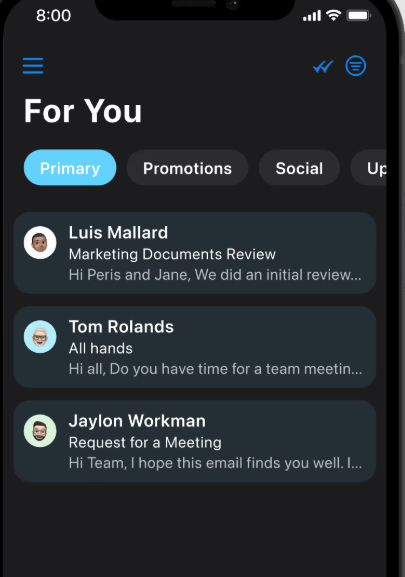
Add light structure directly in the inbox.
- Tag candidates by stage: applied, phone screen, interview, offer, hired, declined
- Create views per role or department
- Combine tags with dates to track time-to-hire
Outcome: Clear pipeline visibility without managing spreadsheets or complex tools.
4. Shared inbox and collaboration with hiring managers
Hiring is a team effort. Your email app should support that.
- Use shared inboxes for recruiting and HR addresses
- Assign candidate conversations to a clear owner
- Add internal comments so feedback stays with the thread
This keeps everyone aligned without forwarding emails or losing context.
5. Follow-up reminders and waiting-for-feedback views
Hiring delays often come from forgotten follow-ups.
- Turn candidate emails into reminders for interviews and feedback
- Set rules like “if no reply in X days”
- Review a focused “waiting for feedback” view
Outcome: Faster decisions and a better candidate experience.
6. Privacy and security for candidate communication
Recruiting inboxes contain sensitive information.
- Encrypted connections to email providers
- Tracker blocking for outreach and scheduling emails
- Controlled access and audit history for shared inboxes
Keep candidate and employee data protected while moving fast.
Email workflows that match real hiring work
Recruiting and HR teams spend most of their day in email. A good email app for recruiters and HR teams supports real hiring workflows - from first application to final offer - without constant tool switching.
1. Daily candidate intake and first response
- New applications arrive in a shared intake view from careers@, jobs@, and referrals.
- A coordinator assigns candidates to the right recruiter so ownership is clear.
- AI-assisted drafts help send quick confirmations and screening questions.
- Stage tags keep candidate progress visible at a glance.
2. Managing interviews and feedback
- Interview scheduling, calendar invites, and feedback live in the same candidate thread.
- Internal comments capture notes and decisions without forwarding emails.
- Reminders ensure feedback is collected promptly after interviews.
3. Handling offers and rejections respectfully
- Offer details and contract questions stay in one controlled thread per candidate.
- AI helps draft clear, professional offer and rejection messages, reviewed before sending.
- Tags and reminders track offer deadlines and start dates.
4. HR communication beyond recruiting
- HR teams manage onboarding and internal communication using similar inbox views.
- Confidential topics stay separated from general HR messages.
- Reminders track reviews, training, and required paperwork.
These inbox-first workflows help teams hire faster, reduce delays, and maintain a respectful candidate experience.
If you work with freelancers, agencies or contractors as part of your talent strategy, you may also want to look at the email app for freelancers with multiple clients.
Why these workflows work
These inbox-first workflows help recruiters and HR teams:
- Move candidates through the hiring process consistently
- Reduce missed follow-ups and delayed feedback
- Keep hiring communication coordinated and auditable
- Maintain focus on active candidates and time-sensitive decisions
All without switching between multiple tools.
Canary helped us stay on top of candidates and feedback, and significantly reduced hiring delays.
- Head of Talent
[cta-block:ctablock1,title="Turn these workflows into your daily support routine",button="Set up Canary Mail for Your Team",buttonlink="https://canarymail.io/downloads"]
Pricing that fits recruiters and HR teams
An email app for recruiters and HR teams should be easy to start and simple to scale.
- Individual recruiters can start free or on a trial
- Teams can add shared inboxes and collaboration
- Clear per-seat pricing with no hidden complexity
You can always see the latest options on the pricing page.
Quick start for recruiters and HR teams
Getting set up takes minutes, not days of IT work.
- Install the app on recruiter and HR devices
Download the app from the downloads page and install it on devices used by recruiters and HR coordinators. - Connect recruiting and HR inboxes
Connect shared addresses such as careers@, jobs@, and hr@, along with individual recruiter accounts. - Define stages and role tags
Define simple stage and role tags that match your current hiring process. - Set up hiring views
Set up views for each role, along with general new applications and waiting for feedback views. - Enable AI assistance
Enable AI summaries and reply drafts for standard messages and adjust them to match your tone.
You can run the app alongside existing tools for a short period, then make it the main inbox for recruiting and HR email.
Built to grow from one recruiter to a full HR team
For recruiters and HR teams, per-seat pricing and shared inbox options make it easy to add more recruiters and coordinators without complex setup or IT involvement.
Whether managing a single role or multiple hiring pipelines, Canary Mail grows as your team and hiring workload grow.
[cta-block:ctablock3,title="Streamline Your Hiring Communication",subtitle="Manage candidates, interviews, and HR communication efficiently with Canary Mail.",button1="Get Started Free for Recruiting Teams",button1link="https://canarymail.io/downloads",button2="Explore all features",button2link="https://canarymail.io/features"]
Email app for recruiters and HR teams - FAQ
Do we need to replace our applicant tracking system to use this email app?
No. This email app for recruiters and HR teams complements your applicant tracking system, it doesn’t replace it. You can continue managing structured hiring data in your ATS, while Canary Mail focuses on day-to-day candidate communication, follow-ups, and coordination inside the inbox.
Can multiple people work on the same recruiting inbox?
Yes. Shared inboxes and assignment rules allow recruiters, coordinators, and HR team members to work from addresses like careers@ or hr@ without confusion. Each conversation has clear ownership, and internal comments let teams coordinate privately without forwarding emails.
How does AI help recruiters without sending generic messages to candidates?
AI assists with summaries and draft suggestions, not automated mass outreach. Recruiters review and edit every message, adjust tone, and add candidate-specific context. This speeds up routine communication while keeping messages human and aligned with your employer brand.
Is this safe for handling sensitive candidate and employee information?
The email app uses encrypted connections and offers controls such as tracker blocking and restricted access to shared inboxes. This helps recruiting and HR teams protect confidential information while staying aligned with internal privacy and compliance policies.
Will this replace our HRIS or payroll system?
No. This email app focuses on communication, follow-ups, and collaboration. Systems for payroll, contracts, and employee records continue to handle those functions, while Canary Mail makes the conversations around them easier to manage.