PGP (Pretty Good Privacy) encryption is a hybrid cryptographic system and the gold standard for email security. It provides end-to-end encryption and digital signatures, ensuring that only the message's recipient can access and decipher its contents, while also confirming the identity of the sender. PGP makes use of unique public and private key pairs to achieve confidentiality, data integrity, and authentication in all your electronic communications.
In an age where digital privacy is paramount, protecting your online communications is non-negotiable. PGP encryption is one of the oldest and most trusted methods for securing your email. PGP stands for "Pretty Good Privacy," a protocol that provides a comprehensive shield for your messages.
If you're an iPhone user looking to protect your emails, adopting PGP is the definitive step toward security. To use PGP effectively, you need a dedicated application. Canary Mail is a modern email client that seamlessly integrates PGP encryption and SecureSend for unparalleled email privacy.
Getting Started: Generating PGP Keys
PGP relies on a public key for encryption and a private key for decryption, which modern email clients like Canary Mail simplify through automatic key generation and secure management.
PGP relies on key pairs—a public key for encryption and a private key for decryption. Managing these keys can often be complex, but modern clients streamline the process.
Canary Mail simplifies key management by offering an automatic setup mode by default, ensuring a hassle-free user experience. However, for users who require explicit control over their keys, Canary Mail retains the flexibility for manual configuration.
To manage your keys:
- Launch the Canary Mail application.
- Navigate to Settings > Security > Manage Keys.
- From here, you can manually configure the keys used to secure your emails, import existing keys, or generate new ones.
[cta-block:ctablock1,title="Make PGP simple and automatic. Get encrypted email today.",button="Secure Your Inbox",buttonlink="https://canarymail.io/downloads"]
The PGP Encryption and Decryption Process
The PGP process uses hybrid cryptography to encrypt the message with a session key, which is then encrypted using the recipient's public key for secure transmission.
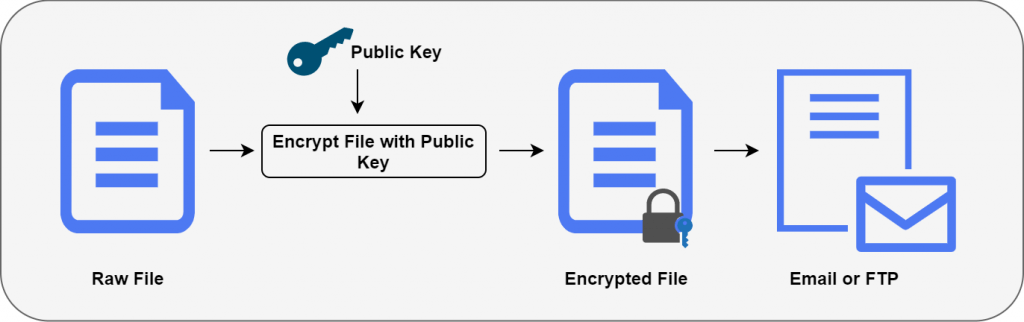
PGP uses a hybrid cryptographic method combining symmetric and asymmetric encryption to ensure confidentiality and speed.PGP Encryption Process:PGP Decryption Process:
- Generate a PGP Key Pair: Use secure software to create your unique public and private key pair.
- Share Your Public Key: Distribute your public key to the intended recipients via a trusted method.
- Import Recipient's Public Key: You must import the recipient's public key into your PGP software.
- Encrypt the Message: Your software uses a random session key (symmetric) to encrypt the message.
- Encrypt the Session Key: The random session key is then encrypted using the recipient’s public key (asymmetric).
- Sign the Message: You sign the message (or the hash of the message) with your private key to prove authenticity and integrity.
- Send the Message: The encrypted message, the encrypted session key, and your digital signature are sent to the recipient.
PGP Decryption Process:
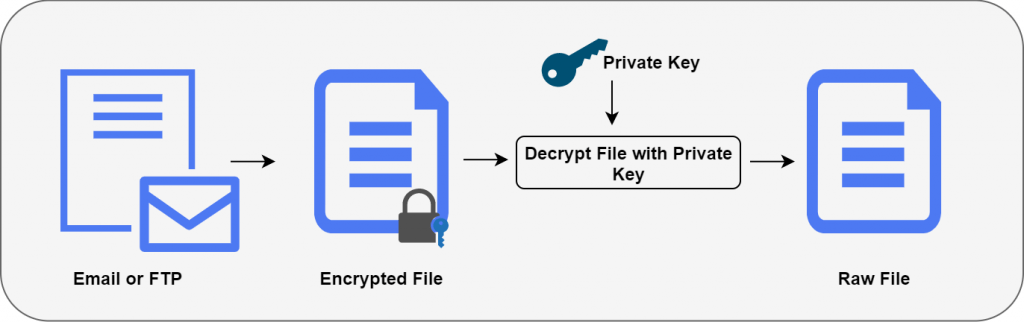
- Decrypt the Session Key: The recipient uses their own private key to decrypt the session key.
- Verify Signature: The recipient uses your public key to verify your digital signature, confirming the sender's identity and checking that the message hasn't been tampered with.
- Decrypt the Message: The recipient uses the recovered session key (symmetric) to decrypt the original message content.
Key Management: Proper and secure storage of your private key is critical to maintaining the integrity and security of all your encrypted communications.
Why PGP is the Gold Standard for Email Security
PGP is the gold standard because it provides End-to-End Encryption (E2EE), digital signatures for authentication, and ensures data integrity via its Web of Trust model.
PGP (Pretty Good Privacy) is foundational to email security for several crucial reasons:
[cta-block:ctablock2,title="Ready to implement PGP encryption?",button1="Download Canary Mail",button1link="https://canarymail.io/downloads",button2="See PGP Features",button2link="https://canarymail.io/"]
Conclusion
PGP is indispensable for digital privacy; modern clients like Canary Mail have simplified this traditionally complicated technology, ensuring end-to-end encrypted communication is accessible to everyone.
PGP is an indispensable security feature for anyone serious about digital privacy. While traditionally complicated, modern email clients are focused on making this technology easy to use. Canary Mail is committed to simplifying the complex, ensuring secure communication is accessible to everyone.
Frequently Asked Questions about PGP
What does PGP stand for, and why is it the "gold standard" for email security?
PGP stands for Pretty Good Privacy. It is considered the gold standard because it provides end-to-end encryption, ensuring that only the intended recipient can read the message. It also employs digital signatures to verify the sender's identity and guarantee that the message has not been altered during transmission.
What is the difference between a PGP Public Key and a Private Key?
They are a unique, mathematically linked pair:
- Public Key: This key is shared freely with the world. It is used by others to encrypt messages intended for you.
- Private Key: This key must be kept secret and secure. It is the only key that can decrypt messages encrypted with your Public Key, and it is used to create your digital signature.
How does PGP encryption handle both confidentiality and sender authentication?
Confidentiality (privacy) is achieved by encrypting the message with the recipient's Public Key (using a temporary session key). Sender authentication and data integrity are achieved through digital signatures: the sender signs the message with their Private Key, and the recipient verifies that signature using the sender's Public Key, proving the message's origin and integrity.
How does an email client like Canary Mail simplify the often-complex PGP process?
Canary Mail removes the typical complexity of manual setup by offering automatic key management by default. It handles the generation, secure storage, and application of PGP keys seamlessly in the background. This makes robust end-to-end encryption accessible and easy for even beginner users.