Short answer: for most people, the best email software for Windows is a free client that handles every account you have. Canary Mail, the new Outlook, Thunderbird, Spark and BlueMail are free with multiple accounts. Pick Outlook if you use Microsoft 365 at work, Thunderbird for free open-source software with no ads, and eM Client or Mailbird if you want a full desktop suite and don't mind paying. Windows Mail and Calendar stopped sending and receiving on December 31, 2024; the new Outlook for Windows replaced them.
Quick picks by need:
- Several providers, same app on your phone: Canary Mail or Spark.
- Microsoft 365 or Exchange at work: Outlook (new or classic).
- Free, open source, no ads: Thunderbird, or Mailspring for something lighter.
- Outlook-style suite without Microsoft 365: eM Client.
- Email plus chat and productivity apps in one window: Mailbird.
- The same free client on Windows, Mac, Linux and phones: BlueMail.
If you use a Mac or phone as well, our guide to the best email app for multiple accounts covers every platform.
Quick comparison
| App | Best for | Free plan | Paid price (USD) | Also runs on |
|---|---|---|---|---|
| Canary Mail | Many accounts, AI, encryption | Unlimited accounts, 2 devices | $36/year (Growth), $100/year (Pro+) | Mac, iPhone/iPad, Android |
| Outlook (new) | Microsoft 365 and Exchange | Free, ads on Outlook.com accounts | Microsoft 365 Basic $1.99/month removes ads | Mac, iPhone/iPad, Android, web |
| Thunderbird | Free, open source, local archives | Everything, unlimited accounts | Free (donations) | Mac, Linux, Android |
| Mailbird | Inbox plus app integrations | 1 account | $4.03/month billed yearly or $99.75 once (US; varies by region) | Mac |
| eM Client | Outlook-style suite | 2 accounts, personal use only | $24.95/year or $39.95 once (Personal) | Mac, free iPhone and Android apps |
| Mailspring | Simple Windows Mail replacement | Multiple accounts, unified inbox | Pro $8/month | Mac, Linux |
| Dove | AI sorting and drafting | Unlimited accounts, 10 AI actions a day | $20/month or $200/year | Mac, iPhone, Android, web |
| Spark | Smart Inbox, small teams | Unlimited accounts, calendar | Plus $99/year, Pro $199/year | Mac, iPhone/iPad, Android |
| BlueMail | Same app on every OS | Unlimited accounts, unified inbox | Plus $5/month or $36/year | Mac, Linux, iPhone/iPad, Android |
The 9 best email clients for Windows in 2026
1. Canary Mail: Best overall for multiple accounts

Disclosure: we make Canary Mail, so weigh this pick accordingly. Every other entry was checked against the vendor's own site.
Canary connects Gmail, Outlook.com, Microsoft 365, Exchange, iCloud, Yahoo and any IMAP mailbox, and the free plan doesn't cap how many you add. You get one unified inbox or a single account at a time, with separate signatures and notifications for each. The same app runs on Windows, Mac, iPhone and Android, so your setup follows you from the PC to your phone. More than 2 million people use it, and Apple has featured it on the App Store and Mac App Store.
- Best for: people with mailboxes at several providers who want the same client on their PC and phone, with AI and privacy tools when they need them
- Price: free (unlimited accounts, up to 2 devices). Growth is $36/year and adds AI Copilot, send later, calendar and scheduling, rules and up to 5 devices. Pro+ is $100/year and adds PGP encryption, SecureSend and phishing and impersonation detection. Both also come as one-time lifetime licenses, with a 7-day trial and no card required.
- Platforms: Windows, Mac, iPhone and iPad, Android
- Standout features: AI that drafts replies and summarizes threads, read receipts, snooze, templates, a bulk cleaner, and end-to-end PGP encryption
- Watch out for: AI, send later, calendar and encryption are on the paid plans, and there's no monthly billing, only yearly or lifetime.
See how it compares head to head in Canary Mail vs Outlook and Canary Mail vs eM Client.
2. Outlook: Best for Microsoft 365 and Exchange (new Outlook)

The new Outlook for Windows is Microsoft's free replacement for Windows Mail and Calendar, and it's the email app on new Windows 11 PCs. It adds Gmail, iCloud, Yahoo and other IMAP accounts next to Outlook.com and Microsoft 365, and puts mail and calendar in one window. Nothing handles Exchange and Microsoft 365 better: shared calendars, room booking and company policies just work.
- Best for: anyone with a Microsoft 365 or Exchange account, and people moving over from Windows Mail
- Price: free. Outlook.com accounts show ads unless you have a Microsoft 365 subscription; Microsoft 365 Basic ($1.99/month or $19.99/year in the US) is the cheapest plan that removes them.
- Platforms: Windows, Mac, iPhone and iPad, Android, web
- Standout features: the best Exchange and Microsoft 365 support, a built-in calendar, web add-ins, and Copilot for Microsoft 365 subscribers
- Watch out for: ads in the inbox on free accounts, and it isn't a full copy of classic Outlook yet. COM add-ins don't work, and opening .pst files needs classic Outlook installed alongside it. If that rules it out, see our Outlook alternatives.
3. Thunderbird: Best free, open-source option

Thunderbird is free, open source and funded by donations, with no ads and no account limits. Mail is stored on your PC, which makes it good for big archives and offline work. Calendar, contacts, OpenPGP encryption and a unified inbox are built in, and add-ons cover most of the rest. It has also caught up on Microsoft accounts: native Exchange mail support arrived in version 145, and version 154 added Microsoft Graph for Microsoft 365 mail.
- Best for: people who want a free desktop client with no company in the middle, large local archives, and anyone who also uses Linux
- Price: free (donations welcome)
- Platforms: Windows, Mac, Linux, Android
- Standout features: local storage, OpenPGP, a big add-on library, and fine-grained filters
- Watch out for: the native Exchange and Microsoft 365 support covers email only for now, so work calendars and address books still need add-ons. The interface takes some setup, and there's no finished iPhone app. More picks in Thunderbird alternatives.
4. Mailbird: Best for email plus app integrations
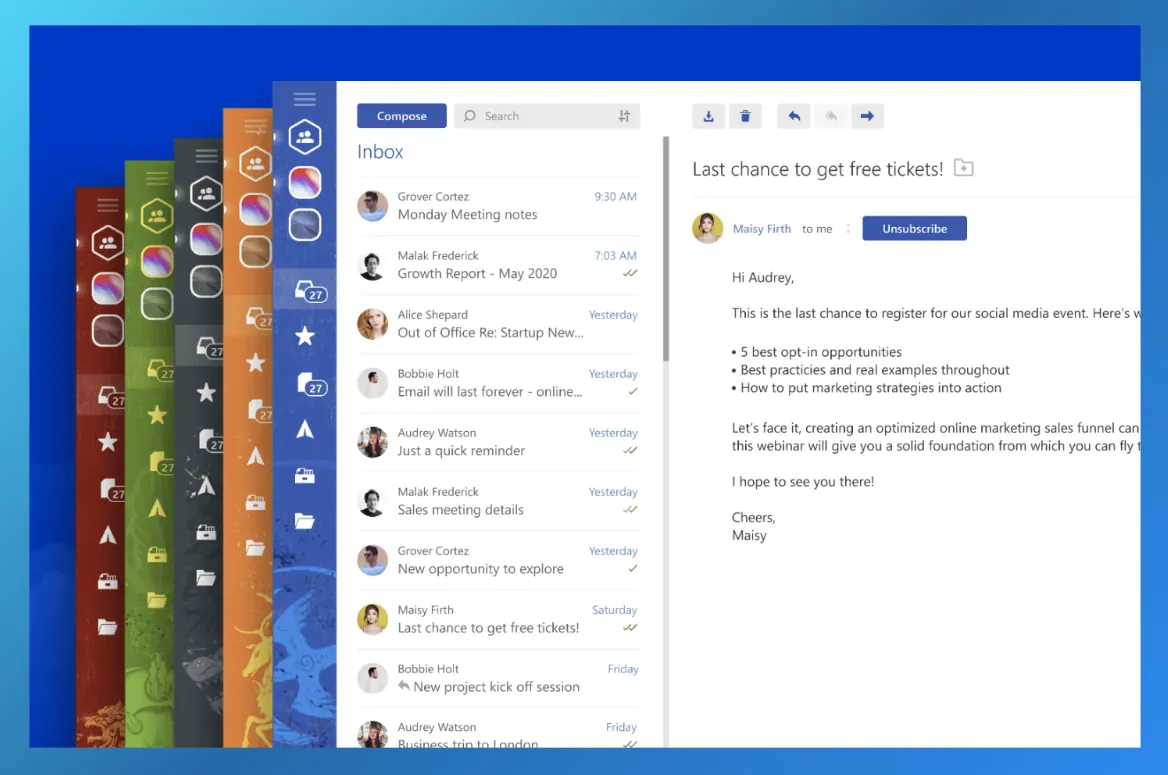
Mailbird started as a Windows-only client and now runs on Mac too, with one license covering both. It puts a unified inbox next to a sidebar of more than 30 apps, such as Slack, Google Calendar, Dropbox and Asana, so chat and tasks sit beside your email. It also has an AI writing assistant, email tracking, snooze and undo send.
- Best for: people who work from their inbox all day and want other apps docked beside it
- Price: free for 1 account. Premium adds unlimited accounts. Mailbird's own pages list the US price as $4.03/month billed yearly or $99.75 as a one-time purchase. The price varies by region (the pricing page shows your local currency), and it often changes with promotions.
- Platforms: Windows, Mac
- Standout features: app integrations, a customizable layout and themes, and email tracking
- Watch out for: with one free account, the unified inbox is effectively a paid feature, and there's no phone app. See Mailbird alternatives.
5. eM Client: Best Outlook-style suite without Microsoft 365

eM Client is the closest thing to classic Outlook without a Microsoft subscription: mail, calendar, tasks, contacts, notes and chat in one desktop window. It works with Google Workspace, Microsoft 365, Exchange and IMAP, and has PGP and S/MIME encryption built in. Paid licenses include its AI features.
- Best for: people leaving Outlook who want everything in one window, and small businesses happy with a per-device license
- Price: free for 2 accounts, personal non-commercial use only. Personal is $24.95/year or $39.95 once (one user, up to 3 devices). Business is $29.95/year or $44.95 once per device.
- Platforms: Windows, Mac, plus free iPhone and Android apps
- Standout features: full calendar and tasks, PGP and S/MIME, and a one-time license option
- Watch out for: any work use needs a paid license, even with one account, and the interface is dense if you only want email. See eM Client alternatives.
6. Mailspring: Best simple replacement for Windows Mail

If you liked how clean Windows Mail was, Mailspring is the closest match. It's free and open source (MIT license), handles several IMAP and Office 365 accounts in a unified inbox, and syncs directly between your provider and your PC rather than through company servers. Search is fast, and the free version includes signatures, spell and grammar checking and translation.
- Best for: people who want a light, good-looking client and nothing more
- Price: free. Pro is $8/month and unlocks templates, send later, read receipts, link tracking, follow-up reminders and unlimited snoozing.
- Platforms: Windows, Mac, Linux
- Standout features: a clean interface, fast search, and direct sync with no middleman
- Watch out for: there's no full calendar yet (you can RSVP to invites, and Mailspring says a full calendar is coming), and there's no phone app. See Mailspring alternatives.
7. Dove: Best for AI sorting and drafting
Disclosure: Dove is made by the same company as Canary Mail, which is us.
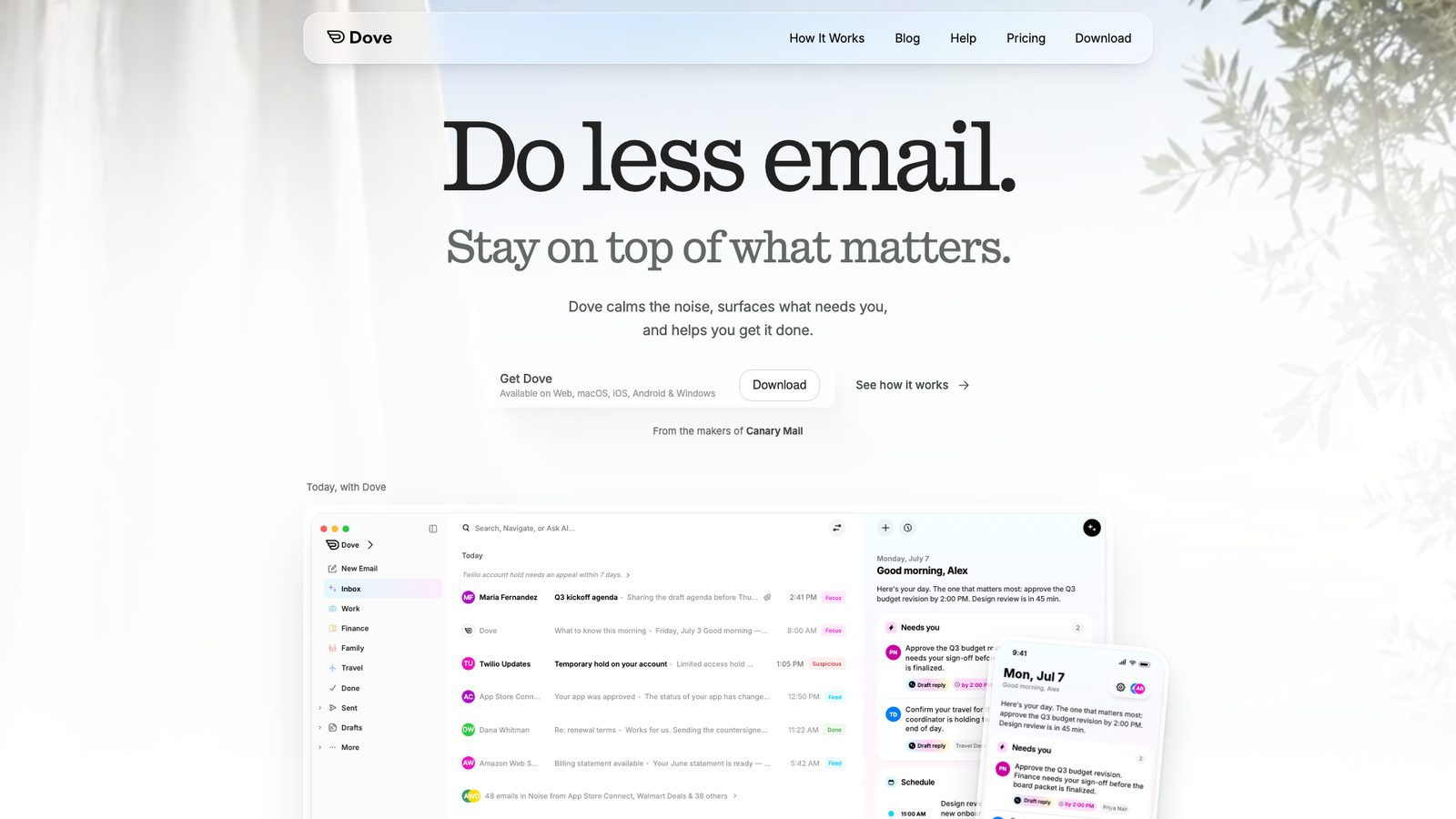
Dove is an AI-first email app rather than a classic folder client. It sorts incoming mail into Focus (what needs you), Feed (updates worth reading) and Noise (newsletters and promotions), and you mark handled mail as Done. Ask Dove answers questions about your inbox and drafts replies, Smart Rules take plain-language instructions, and it scans mail for phishing, malware and impersonation. It works with Gmail, Outlook, Microsoft 365, Yahoo and IMAP.
- Best for: busy inboxes where you'd rather let AI triage and draft than file mail yourself
- Price: free with unlimited accounts and 10 AI actions a day. Pro is $20/month or $200/year and removes the limits. The 7-day Pro trial needs a card.
- Platforms: Windows, Mac, iPhone, Android, web
- Standout features: automatic Focus/Feed/Noise triage, Ask Dove, and plain-language rules that sync across devices
- Watch out for: it's a newer app built around AI triage, so if you like manual folders and classic rules, a traditional client fits better. Pro costs more than most one-time licenses here. Read more in introducing Dove.
8. Spark: Best for a smart inbox and small teams

Spark, from Readdle, is free with unlimited accounts, a calendar and its Smart Inbox, which groups mail from people, newsletters and notifications. The paid plans add AI tools, meeting notes and team features such as shared drafts and comments. It's available from the Microsoft Store and syncs with the Mac, iPhone and Android apps.
- Best for: busy inboxes and small teams that want to discuss email without forwarding it
- Price: free. Plus is $10/month or $99/year; Pro is $20/month or $199/year.
- Platforms: Windows, Mac, iPhone and iPad, Android
- Standout features: Smart Inbox, a built-in calendar, and shared drafts and team comments
- Watch out for: some features process your mail on Spark's servers (recent emails are kept there for a few hours, for example), and the AI and team tools are paid. See Spark alternatives.
9. BlueMail: Best for the same free app on every OS

BlueMail runs on Windows, Mac, Linux, iPhone and Android, which is wider coverage than anything else here. The free Personal plan includes unlimited accounts, a unified inbox, Clusters (mail grouped by sender type) and PGP encryption.
- Best for: people who switch between Windows, Linux and a phone and want one free app everywhere
- Price: free. Plus, which adds GemAI and email backup, was $5/month or $36/year at the time of writing (a sale price; the regular yearly price is $49).
- Platforms: Windows, Mac, Linux, iPhone and iPad, Android
- Standout features: Clusters, free PGP, and the widest platform list
- Watch out for: the interface is busy, and the AI assistant and email backup need a paid plan. See BlueMail alternatives.
Best free email programs for Windows 10 and 11
You don't need to pay for a good email program on Windows. These are free with no trial clock:
- New Outlook: free and already on Windows 11, with ads on Outlook.com accounts.
- Thunderbird: free with no ads and no limits, and the best free choice for local archives.
- Canary Mail: unlimited accounts free on up to 2 devices.
- Mailspring: free, light and open source; Pro features cost extra.
- Spark and BlueMail: free with unlimited accounts and phone apps.
- eM Client: free only for 2 accounts and personal use.
A note for Windows 10 users: Microsoft ended Windows 10 support on October 14, 2025, and consumer Extended Security Updates run until October 12, 2027. If you're still on Windows 10, check each app's system requirements before you install, and plan your move to Windows 11. For free picks on Mac and phones as well, see our list of the best free email clients.
What happened to Windows Mail and Calendar?
Mail, Calendar and People were retired on December 31, 2024
Microsoft ended support for the Windows Mail, Calendar and People apps on December 31, 2024. Since then they can't send or receive email or calendar events, but anything stored locally in them can still be exported. Microsoft's replacement is the new Outlook for Windows, which you can open from the prompt in the old Mail app or download from the Microsoft Store. You don't have to use Outlook, though: any client on this list works.
How to move your mail out of Windows Mail
If your account was Outlook.com, Gmail or another IMAP account, your mail is still on the server, and adding the account to a new client brings it back. POP accounts and some other setups kept mail only on your PC, so export it first:
- Run the PowerShell script from Microsoft's guide (linked below), then choose Export Data in the "Windows Mail and Calendar are no longer supported" message. File Explorer opens a folder with your messages as .eml files and your calendar as an .ics file.
- The People app then opens: choose Download, then Export, and save your contacts as a .csv file.
- In the new Outlook, import mail under Settings > General > Import > Start import, the calendar under Calendar > Add calendar > Upload from file, and contacts under People > Manage contacts > Import contacts. Most other clients, including Thunderbird, can import .eml files and .ics calendars too.
Microsoft's step-by-step guide is Export emails and contacts from Windows Mail or People.
Windows Live Mail ended in 2017
Windows Live Mail was part of Windows Essentials 2012. Microsoft ended support on January 10, 2017 and removed the download. It hasn't had a security update since, so don't install it from a third-party download site. Thunderbird can import its mail, and Mailspring is the closest in feel.
Closest replacements if you liked Windows Mail
- Mailspring: the most similar clean, simple look.
- New Outlook: Microsoft's official successor, with mail and calendar together.
- Thunderbird: free and with more features, including calendar and contacts.
New Outlook vs classic Outlook
Windows now has two Outlook apps. The new Outlook is free and built on Outlook on the web. Classic Outlook is the desktop program that comes with Microsoft 365 and Office.
Microsoft is moving business users to the new Outlook in three stages: opt-in (the current stage, with a "Try the new Outlook" toggle), opt-out (new Outlook on by default), and cutover. Admins get at least 12 months' notice before each later stage, and Microsoft says existing installations of classic Outlook will be supported until at least 2029.
What changes if you switch:
- Add-ins: COM add-ins don't work in the new Outlook; web add-ins do.
- .pst files: the new Outlook can open them only when classic Outlook is also installed.
- Ads: free Outlook.com accounts see ads; a Microsoft 365 subscription removes them.
- Other accounts: Gmail, iCloud, Yahoo and IMAP accounts are supported alongside Microsoft ones.
If neither version suits you, our Outlook alternatives guide goes further.
"Send to mail recipient" and other programs that start an email
Some Windows programs can hand a file to your email app to start a new message: File Explorer's Send to > Mail recipient, Office's Share or Send as attachment, and some scanner, accounting and tax programs. This uses an old Windows interface called Simple MAPI, and it only works with whichever app is registered as your default mail program. It has nothing to do with sending and receiving email: every app on this list does that normally.
Classic Outlook and Thunderbird both register for it, and eM Client offers to make itself the default mail program. The new Outlook is different. Answers in Microsoft's own community forums report that it has limited support for these requests, and that they get passed to classic Outlook instead. If you rely on a scanner or accounting program that emails files this way, test it before you switch, keep classic Outlook as your default mail app, or simply attach the file from inside your email app.
For Exchange and Microsoft 365, the apps with the deepest support are Outlook, eM Client and Thunderbird (email only for now). Canary, Spark, Mailspring and Dove connect Microsoft 365 mailboxes too.
How to choose an email client for Windows
- Accounts and providers: count your accounts and check the free plan's limit. Mailbird (1) and eM Client (2) cap free users.
- Work email: if your company runs Microsoft 365, check whether IT allows third-party apps. Outlook is the safe default.
- Calendar: Outlook, eM Client, Thunderbird, Spark and Canary's paid plans have one built in. Mailspring doesn't yet.
- Where your mail lives: Thunderbird and Mailspring connect straight to your provider. Some apps process mail on their own servers for certain features, so read the privacy page if that matters to you.
- Phone app: if you want the same client on your phone, pick Canary, Outlook, Spark, BlueMail, Dove or eM Client.
- How you pay: Canary, eM Client and Mailbird sell one-time licenses; Spark and Dove are subscriptions; Thunderbird is free.
How we chose
We make Canary Mail (#1) and Dove (#7), so read those picks with that in mind. To pick the rest, we read the lists that rank on the first page of Google for "email software for Windows" and related searches, counted how often each app appeared and how high, and kept the apps that most lists agree on. We left out discontinued apps such as Postbox, and apps that only work with one email service. We checked every price, plan and platform on the vendor's own site on September 25, 2026. Prices are US list prices and change often, so check before you buy.
FAQ
Does Windows 11 have a built-in email app?
Yes. The new Outlook for Windows is the built-in email and calendar app on Windows 11. It's free, works with Outlook.com, Microsoft 365, Gmail, iCloud, Yahoo and other IMAP accounts, and shows ads on free Outlook.com accounts.
Can I still use Windows Mail?
No. Windows Mail and Calendar stopped sending and receiving on December 31, 2024. You can still open the app to export mail stored on your PC, but you'll need the new Outlook or another client to keep using email.
Is the new Outlook for Windows free?
Yes. It's free to download and use. Free Outlook.com accounts see ads in the inbox; any Microsoft 365 subscription, including Basic at $1.99/month in the US, removes them.
What is the best free email program for Windows 10 and 11?
Thunderbird is the best fully free option, with no ads or limits. The new Outlook is best if you use Microsoft accounts, and Canary Mail, Spark and BlueMail are free with unlimited accounts and phone apps.
Can I still download Windows Live Mail?
Not from Microsoft. It was retired with Windows Essentials 2012 in January 2017 and gets no security updates. Copies on download sites are unsafe; use Thunderbird or Mailspring instead.
Is Thunderbird better than Outlook?
It depends on your account. Thunderbird is better if you want free, ad-free, open-source software with local storage. Outlook is better for Microsoft 365 and Exchange, especially shared calendars. Our Canary Mail vs Thunderbird comparison covers another option.
Which email programs work with "Send to mail recipient"?
The ones that register as your default mail program for this, such as classic Outlook and Thunderbird. Microsoft community answers report that the new Outlook has limited support for it. It only affects other programs starting an email for you, not normal sending.
Can I use Gmail in a desktop email client on Windows?
Yes. Every app on this list supports Gmail. Most sign in through Google's own login page (OAuth), so you don't need to type your password into the app or turn on less secure access.
Sources
Checked September 25, 2026.
- Windows Mail, Calendar and People retirement: support.microsoft.com (Outlook for Windows: the future of Mail, Calendar and People)
- Exporting from Windows Mail and People: support.microsoft.com
- Windows Essentials 2012 and Windows Live Mail: support.microsoft.com/en-us/windows/apps/support-for-windows-essentials-apps
- New Outlook migration stages and classic Outlook support: learn.microsoft.com
- New Outlook feature comparison (COM add-ins, .pst files): support.microsoft.com
- Microsoft 365 Basic and ad-free Outlook: microsoft.com, support.microsoft.com
- Windows 10 end of support: support.microsoft.com
- Canary Mail pricing: canarymail.io/pricing
- Thunderbird: thunderbird.net, blog.thunderbird.net (Exchange and Microsoft Graph support)
- Mailbird pricing and platforms: getmailbird.com
- eM Client pricing: emclient.com/pricing
- Mailspring and Mailspring Pro: getmailspring.com
- Dove: dove.email, dove.email/pricing
- Spark pricing and privacy: sparkmailapp.com/pricing, sparkmailapp.com/privacy
- BlueMail pricing: bluemail.me/pricing