In today's fast-paced digital world, staying on top of your emails can be a daunting task. Important messages often get buried under a mountain of less crucial emails, leading to missed opportunities and critical information slipping through the cracks. Fortunately, with the right approach and the help of email management tools like Canary Mail, you can ensure that you never miss those crucial emails again.
1. Organize Your Inbox
The first step in not missing important emails is to keep your inbox organized. Start by creating folders or labels to categorize emails effectively. For instance, you can have separate folders for work, personal, and subscriptions. This way, you'll be able to navigate your inbox with ease and quickly locate essential messages. Canary Mail simplifies organization by allowing you to create folders and labels with ease. You can easily move emails to folders by right-clicking on the email and selecting the folder you wish to move it to. Thus, with folders and labels, you can efficiently categorize and access emails, ensuring that nothing crucial gets lost in the shuffle.
2. Utilize Filters
Email filters are a valuable tool to automatically sort and label incoming emails. Set up filters to categorize emails based on specific criteria. For instance, you can filter emails from your boss or important clients into a designated folder, ensuring you never overlook their messages. You can set rules/filters via your email provider's web interface. All moves etc. will reflect within Canary.
3. Prioritize Your Contacts
Consider designating certain contacts as VIPs in your email client. With Canary Mail, you can assign specific contacts as "Favorites." You can find your favorite/important users in the side bar under the Favorites title.
4. Set Up Notifications
Don't rely solely on your memory or constant manual email checking. Configure your email app, such as Canary Mail, to send you notifications for emails as soon as you receive them (Push Notifications). Push notifications are clickable pop-up messages that appear on your device. They serve to deliver timely and relevant information, even when you’re not actively using the app.
5. Use Canary Mail's Smart Notifications
One of Canary Mail's standout features is its smart notifications. This feature in Canary enables you to stop notifications for newsletters and other unimportant emails. Thus, Canary Mail ensures you receive timely alerts for emails that truly matter.
6. Snooze Non-Urgent Emails
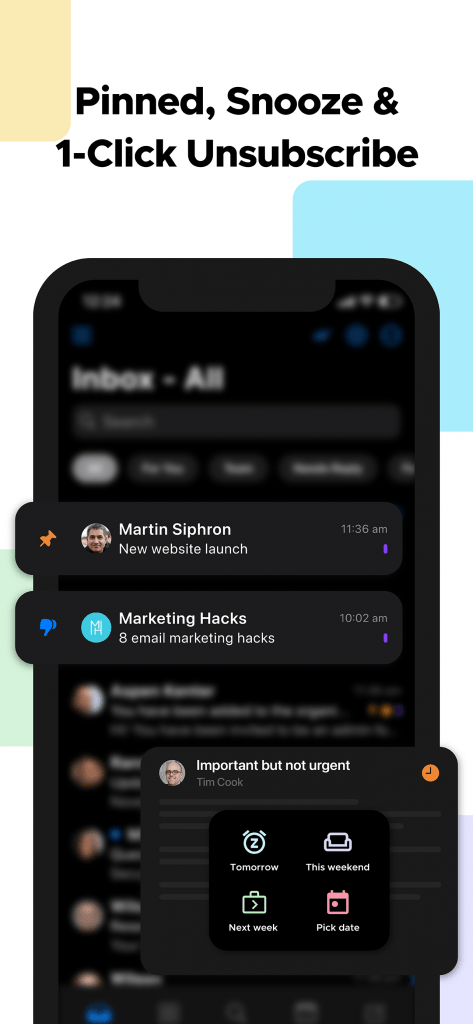
Don't let less important emails clutter your inbox. With Canary Mail's snooze feature, you can temporarily remove emails from your inbox and have them return at a time that suits you. This keeps your inbox focused on the emails that require your immediate attention.
7. Inbox Prioritization
Canary Mail's "Copilot Tabs" automatically separate your emails into four tabs: "For You", "Team", "Needs Reply" and "Follow Up". You can edit which tabs are shown and their order via Settings. This feature helps you prioritize your email reading and ensures that vital messages don't get lost amidst the noise.
8. Unsubscribe from Unwanted Emails
If you find yourself consistently receiving unimportant newsletters or promotional emails, take a moment to unsubscribe from them. Canary Mail makes it easy to unsubscribe with its 1-Click Unsubscribe feature, keeping your inbox clutter-free.
9. Regularly Review Your Spam Folder
Check your spam or junk folder periodically. Sometimes, important emails might end up there due to overactive spam filters. With Canary Mail, you can easily move emails from your spam folder to your inbox, ensuring you don't overlook anything crucial. Custom Swipe and thread actions let you configure swipes and thread actions to easily archive, delete, set to snooze, move etc. an email in the list.
https://www.youtube.com/watch?v=rz3HTOvK4YA
In conclusion, 'How to not miss important emails' is a matter of efficient email management, and Canary Mail is an invaluable tool in this endeavor. By employing its features for organization, smart notifications, and focused inboxes, you can be confident that you'll never overlook crucial messages again. Stay on top of your inbox, streamline your email management, and keep important emails within reach with Canary Mail.